RMI overview
RMI (Remote Motion Interface) is a TCP-based protocol for sending motion commands, managing frames, and controlling the robot remotely.
RMI (Remote Motion Interface) is a TCP-based protocol that lets you send TP-equivalent motion instructions and administrative commands to a Fanuc controller in real time.
Robot requirements
- Option R912 (Remote Motion Interface) must be loaded on the controller.
- The bootstrap port is 16001 (TCP).
- Before calling
Initialize(), the teach pendant must be disabled and the controller must be in AUTO mode. - Do not leave the RMI_MOVE TP program selected on the teach pendant before calling
Initialize().
How it works
- Connect to the controller on the bootstrap port (16001). The controller assigns a working port for the session.
- Call
Initialize()to create theRMI_MOVETP program and start it. - Send motion or non-motion instructions via
SendTpInstruction(). Each call returns anRmiInstructionResponseyou can track. - The client manages the 8-slot controller buffer automatically. Instructions beyond that limit are held locally and sent as soon as a slot is free.
- When done, call
Abort()orDisconnect(). Always end your session with one of those; otherwise the controller keeps RMI_MOVE selected and other TP programs cannot run.
Quick example
parameters.Rmi.Enable = true;robot.Connect(parameters);// Initialize the RMI_MOVE program on the controller.// TP must be disabled and the controller must be in AUTO mode.robot.Rmi.Initialize();// Linear motion at 100 mm/s to a Cartesian target (tool 1, frame 0)var instr = new LinearMotionTpInstruction{SpeedType = RmiLinearSpeedType.MmSec,Speed = 100,TermType = RmiTerminationType.Fine,Target = new CartesianPositionWithUserFrame(500, 200, 300, 0, 90, 0, tool: 1, frame: 0)};RmiInstructionResponse r = robot.Rmi.SendTpInstruction(instr);// Wait for the controller to confirm the motion completedr.WaitForCompletion();if (r.Status == RmiInstructionStatus.Error)System.Console.WriteLine("Error: " + r.ErrorText);// Abort when done - always end the session with Abort() or Disconnect()robot.Rmi.Abort();robot.Disconnect();}}
Connection
{FanucRobot robot = new FanucRobot();// Enable RMI and connect. The bootstrap port is 16001.// The controller assigns a working port automatically.ConnectionParameters parameters = new ConnectionParameters("192.168.0.1");parameters.Rmi.Enable = true;robot.Connect(parameters);System.Console.WriteLine("Connected: " + robot.Rmi.Connected);System.Console.WriteLine("Protocol version: " + robot.Rmi.MajorVersion + "." + robot.Rmi.MinorVersion);System.Console.WriteLine("Working port: " + robot.Rmi.WorkingPort);// Subscribe to events before sending instructionsrobot.Rmi.SystemFaultReceived += seqId =>System.Console.WriteLine("System fault on sequence " + seqId);robot.Rmi.ConnectionTerminated += () =>System.Console.WriteLine("Controller closed the RMI session");robot.Rmi.RecordedCartesianPositionReceived += pos =>System.Console.WriteLine("Recorded position " + pos.PositionId);robot.Disconnect();}}
Initialize and status
Call Initialize() after connecting. Check the controller state with GetStatus() first if needed.
parameters.Rmi.Enable = true;robot.Connect(parameters);// Check controller state before initializingRmiControllerStatusResponse status = robot.Rmi.GetStatus();System.Console.WriteLine("Servo ready: " + status.ServoReady);System.Console.WriteLine("TP enabled: " + status.TPEnabled);System.Console.WriteLine("RMI running: " + status.RmiMotionStatus);// Initialize: creates and starts the RMI_MOVE TP program.// Will throw if TP is enabled or servos are off.robot.Rmi.Initialize();// For multi-group controllers, specify a group mask (bit N = group N+1)// robot.Rmi.Initialize(groupMask: 0b00000011); // groups 1 and 2// Enable real-time singularity avoidance (requires MajorVersion >= 6, R792 option)// robot.Rmi.Initialize(rtsa: true);// Set palletizing motion mode (requires MajorVersion >= 7)// robot.Rmi.Initialize(pltzMode: RmiPltzMode.ZeroDown);System.Console.WriteLine("RMI initialized");// The controller checks sequence IDs by default.// AutoSetNextSequenceId() resynchronizes the counter if needed.robot.Rmi.AutoSetNextSequenceId();robot.Rmi.Abort();robot.Disconnect();}}
Instruction pipeline
SendTpInstruction() returns an RmiInstructionResponse immediately. The instruction goes through several states:
| Status | Meaning |
|---|---|
LocalQueued | Held in the client buffer, not yet sent (controller buffer full). |
ControllerQueued | Sent to the controller, waiting its turn. |
Executing | The robot is currently executing this instruction. |
Completed | Done without error. |
Error | Failed. Check ErrorId and ErrorText. |
Call WaitForCompletion() to block until the instruction reaches a terminal state.
Troubleshooting
"Connection refused by controller"
Connect() throws a ConnectException with this message. It is not a network problem: the controller answered on port 16001, then refused the RMI session. The inner exception is an RmiException, and its ErrorId gives the error code of the controller.
Check:
- Option R912 is loaded on the controller.
- No alarm is active on the teach pendant. Reset the alarms and try again.
- No other RMI session is open. A session that was not ended with
Abort()orDisconnect()keepsRMI_MOVEselected. Abort the programs on the teach pendant (FCTN,ABORT (ALL)), then connect again.
Demonstration
Online sequence builder
fanuc-rmi-demo.underautomation.com is a web application to build a robot sequence with blocks, run it on a simulated robot or on a real one, and get the C# or Python code of the sequence. The source code is on GitHub.
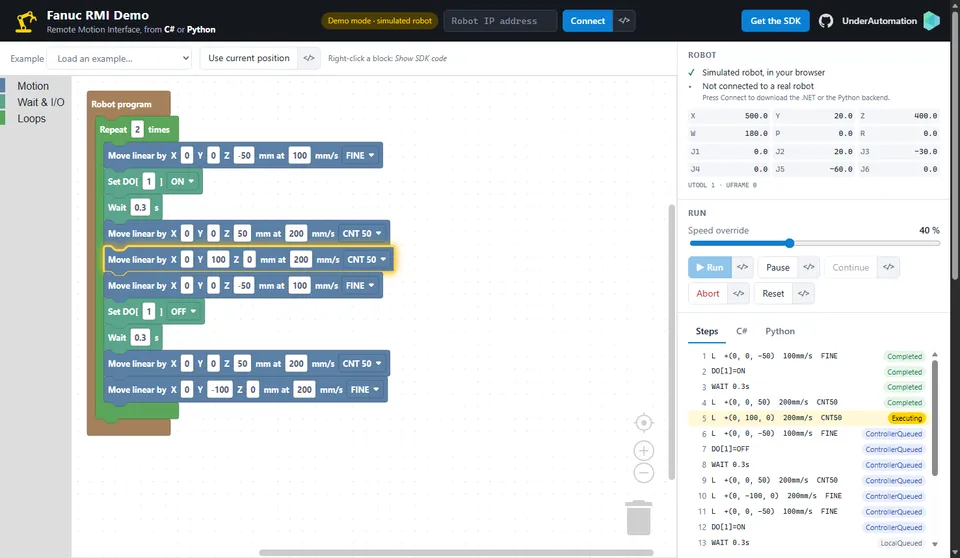
Demo application
Everything on this page can be tried without writing code, in the RMI (R912) page of the demo application.
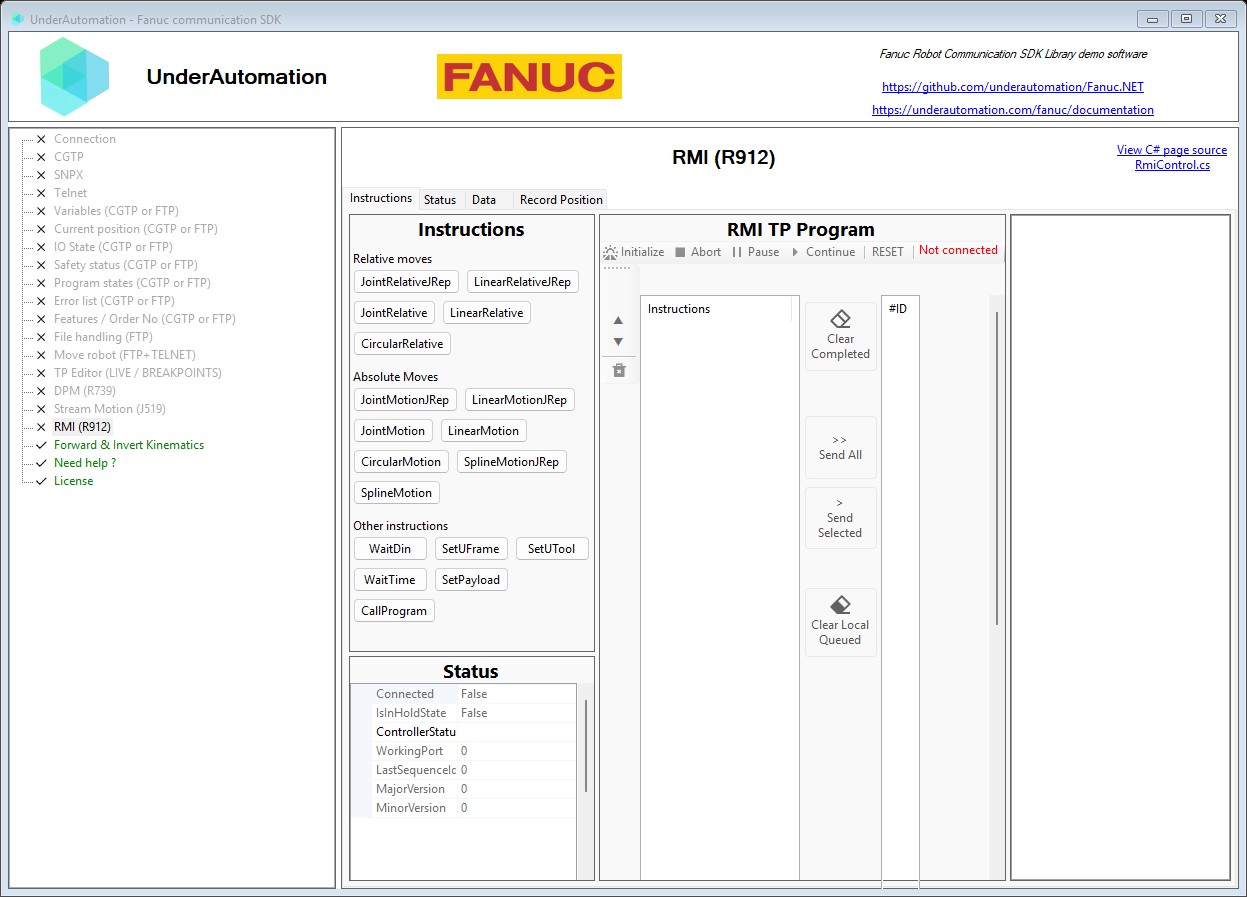
The demo application is open source. The C# source of this page is RmiControl.cs.
Next steps
- Motion commands: linear, joint, circular, spline motions and non-motion instructions.
- Frames, I/O & status: frame management, I/O, position reading, registers.
API reference
RMI client for connecting to and controlling FANUC robots via the Remote Motion Interface protocol.
| Member | Type | Description |
|---|---|---|
RmiClient() Constructor | Creates a new instance of the RMI client. | |
Connect(string, int, int) Method | void | Connect to the FANUC controller using the RMI protocol.
|
High-level Remote Motion Interface (RMI) client for FANUC controllers. Manages the connection lifecycle, all administrative commands, and the full set of motion instruction packets over the RMI TCP protocol.
| Member | Type | Description |
|---|---|---|
RmiClientBase() Constructor | Creates a new instance of the RMI client. | |
CheckSequenceId Property | bool | Indicates whether the controller checks for consecutive sequence IDs in motion instructions ($RMI_CFG.$Chk_seqID). Modified by AutoSetNextSequenceId. |
Connected Property read only | bool | Indicates that the client is currently connected to the controller working port. |
Instructions Property read only | RmiInstructionResponse[] | All instructions submitted since the last Initialize(Nullable%Byte%7d%Nullable%Boolean%7d%Nullable%RmiPltzMode%7d) or explicit clear, in submission order. Includes instructions in all states: LocalQueued, ControllerQueued, Executing, Completed and Error. Returns a snapshot array; the array is not updated after it is returned. |
IsInHoldState Property read only | bool | Indicates that the controller has entered the HOLD state and will not accept new TP instructions until Reset is called. The HOLD state is entered in two situations: <ul><li> An invalid sequence ID was detected (error RMIT-029, error code 2556957). RMI checks that sequence IDs are consecutive. If a gap is found, RMI rejects the instruction and enters HOLD. The controller continues executing the TP instructions already queued but blocks all new ones. Use AutoSetNextSequenceId to recover the correct sequence ID, then call Reset before resuming. </li><li> An invalid motion instruction was received (error RMIT-024, error code 2556952), for example a motion option that is not loaded on the controller. RMI returns an error for that instruction, puts the controller in HOLD, and continues executing any instructions already in the TP program queue. Call Reset once the problem is corrected, then resume sending instructions. </li></ul> All instructions sent while in the HOLD state are ignored by the controller and returned with an error code. This flag is cleared automatically when Reset succeeds. |
LastSequenceId Property read only | int | Sequence ID used for the last instruction sent to the controller. Reset to 0 by Initialize(Nullable%Byte%7d%Nullable%Boolean%7d%Nullable%RmiPltzMode%7d).. Modified by AutoSetNextSequenceId. |
MajorVersion Property read only | short | Controller protocol major version reported during the connection handshake. |
MinorVersion Property read only | short | Controller protocol minor version reported during the connection handshake. |
ReadTimeoutMs Property read only | int | RMI connection parameters used during Connect(). |
WorkingPort Property read only | int | Working port returned by the controller; all commands use this port after connection. |
ConnectionTerminated Event | Action | Fired when the controller closes the session (e.g. communication idle timeout). The client is automatically disconnected after this event fires. |
RecordedCartesianPositionReceived Event | Action<RmiRecordedCartesianPosition> | Fired when the controller sends a Cartesian position via the RMI Position Record menu. |
RecordedJointPositionReceived Event | Action<RmiRecordedJointPosition> | Fired when the controller sends a joint position via the RMI Position Record menu. |
SystemFaultReceived Event | Action<int> | Fired when the controller reports a system fault on a given sequence. The argument is the SequenceID of the faulted instruction (0 when unknown). |
UnknownPacketReceived Event | Action<RmiResponseBase> | Fired when the controller sends a response that the SDK does not know. |
Abort() Method | void | Abort the running motion program. Note that a Reset() will be called automatically if the controller is in the HOLD state. |
AutoSetNextSequenceId() Method | RmiControllerStatusResponse | Calls internally GetStatus and set LastSequenceId only if $RMI_CFG.$Chk_seqID = FALSE. It also set CheckSequenceId to $RMI_CFG.$Chk_seqID. |
ClearCompletedInstructions() Method | void | Removes all instructions with a terminal status ( Completed or Error) from the tracked instruction list. Instructions that are still pending or in progress are not affected. |
ClearLocalQueuedInstructions() Method | void | Cancels and removes all instructions that are still in the local client buffer ( LocalQueued). These instructions have not been sent to the controller yet. Each cancelled instruction is marked with an error so that any thread blocked on WaitForCompletion(int) is unblocked. Instructions already sent to the controller are not affected. |
ConnectInternal(string, int, int) Method | void | Connect to the controller: perform the bootstrap handshake on the given port, obtain the working port, then switch to it for all subsequent commands. |
Continue() Method | void | Resume a paused motion program. |
Disconnect() Method | void | Disconnect from the controller by sending the disconnect command on the working port. Safe to call even when already disconnected. |
Dispose() Method | void | Disconnect from the controller and release resources. |
GetExtendedStatus() Method | RmiExtendedControllerStatusResponse | Get extended controller status including drive power state and speed clamp. |
GetStatus() Method | RmiControllerStatusResponse | Get the current controller and RMI motion status. |
GetUFrameUTool(byte?) Method | RmiUFrameUToolNumbersResponse | Get the current UFRAME and UTOOL numbers.
|
Initialize(byte?, bool?, RmiPltzMode?) Method | void | Initialize RMI and start the motion program. Must be called before sending any motion instructions. It also Resets LastSequenceId and empty the instruction buffer Instructions
|
Pause() Method | void | Pause the running motion program. |
ReadCartesianPosition(byte?) Method | RmiCartesianPositionResponse | Read current Cartesian TCP position.
|
ReadDIN(short) Method | RmiDigitalInputValueResponse | Read a digital input port value. |
ReadError(byte?) Method | RmiControllerErrorTextResponse | Read the most recent controller error text. Up to 5 consecutive errors can be requested.
|
ReadIOPort(RmiIoPortType, int) Method | RmiIoPortValueResponse | Read a generic IO port (DI, DO, AI, AO, GO, RO, FLAG, RI, UI, UO).
|
ReadJointAngles(byte?) Method | RmiJointAnglesSampleResponse | Read current joint angles.
|
ReadNumericRegister(int) Method | RmiNumericRegisterValueResponse | Read a numeric register
|
ReadPositionRegister(short, byte?) Method | RmiPositionRegisterDataResponse | Read a position register
|
ReadTcpSpeed() Method | RmiTcpSpeedResponse | Read the current TCP speed in mm/s. |
ReadUFrame(byte, byte?) Method | RmiIndexedFrameResponse | Read the UFRAME at the given index.
|
ReadUTool(byte, byte?) Method | RmiIndexedFrameResponse | Read the UTOOL at the given index.
|
ReadVariable(string) Method | RmiVariableValueResponse | Read a system variable by name (name must include the leading $ character). |
Reset() Method | void | Reset controller errors and exit the HOLD state. |
SendTpInstruction(RmiInstructionBase) Method | RmiInstructionResponse | Sends the instruction to the controller, which queues it. Returns an RmiInstructionResponse that tracks execution.
|
SetOverride(byte) Method | void | Set the program speed override (1–100 %). |
SetPayloadCompensation(byte, float, float, float, float, float, float, float, byte?) Method | void | Define payload compensation parameters for a payload schedule.
|
SetPayloadCompensation(RmiSetPayloadCompensationParameters) Method | void | Define payload compensation parameters for a payload schedule.
|
SetPayloadSchedule(byte, byte?) Method | void | Immediately apply a payload schedule to the active group (command, not an instruction).
|
SetPayloadValue(byte, float, float, float, float, float?, float?, float?, byte?) Method | void | Define payload mass, center of gravity, and optionally inertia for a payload schedule.
|
SetPayloadValue(RmiSetPayloadParameters) Method | void | Define payload mass, center of gravity, and optionally inertia for a payload schedule.
|
SetUFrameUTool(byte, byte, byte?) Method | void | Set the current UFRAME and UTOOL numbers.
|
WriteDOUT(short, RmiOnOff) Method | void | Write a digital output port value. |
WriteIOPort(RmiIoPortType, int, double) Method | void | Write a generic IO port (AO, GO, DO, RO, FLAG).
|
WriteNumericRegisterAsDouble(int, double) Method | void | Write a float value to a numeric register
|
WriteNumericRegisterAsInteger(int, int) Method | void | Write an integer value to a numeric register
|
WritePositionRegisterCartesian(short, CartesianPositionWithUserFrame, byte?) Method | void | Write a Cartesian position register
|
WriteUFrame(byte, XYZWPRPosition, byte?) Method | void | Write the UFRAME at the given index.
|
WriteUTool(byte, XYZWPRPosition, byte?) Method | void | Write the UTOOL at the given index.
|
WriteVariableAsDouble(string, double) Method | void | Write a float value to a system variable (name must include the leading $). |
WriteVariableAsInteger(string, int) Method | void | Write an integer value to a system variable (name must include the leading $). |
Response returned immediately when a motion instruction is queued. The Status property and ErrorId are updated in the background as the controller processes the instruction. Use WaitForCompletion(int) to block until the instruction reaches a terminal state.
| Member | Type | Description |
|---|---|---|
RmiInstructionResponse() Constructor | ||
Instruction Property read only | RmiInstructionBase | Sent instruction |
SequenceId Property read only | int | Sequence identifier assigned to this instruction. 0 until the instruction has been dispatched to the controller. |
Status Property read only | RmiInstructionStatus | Current execution state of the instruction. |
StatusChanged Event | Action<RmiInstructionStatus> | Fired each time Status changes. The argument is the new status value. This event may be raised from a background thread. |
Equals(object) Method | bool | |
GetHashCode() Method | int | |
ToString() Method | string | |
WaitForCompletion(int) Method | bool | Blocks the calling thread until the instruction reaches a terminal state ( Completed or Error), or until timeoutMs milliseconds have elapsed. Pass -1 (or omit) to wait indefinitely.
|
Status snapshot returned by FRC_GetStatus.
| Member | Type | Description |
|---|---|---|
RmiControllerStatusResponse() Constructor | ||
CheckSequenceId Property read only | bool | Indicates the value of $RMI_CFG.$Chk_seqID, which is the configuration value that determines whether the controller checks valid incremented sequence IDs on incoming instructions. |
NextSequenceId Property | int? | The next valid sequence ID. This key is only valid if the system variable $RMI_CFG.$Chk_seqID = TRUE |
NumberUFrame Property | byte | Number of user frames available in the robot controller |
NumberUTool Property | byte | Number of user tools available in the robot controller |
ProgramStatus Property | TaskStatus | RMI_MOVE program status |
RmiMotionStatus Property | bool | The Remote Motion Interface is running |
ServoReady Property | bool | The robot controller is ready for motion |
SingleStepMode Property | bool | Single step mode |
SpeedOverride Property | byte | The current speed override setting (1–100). |
TPEnabled Property | bool | Teach Pendant Enabled (Switch on position ON) The Remote Motion interface only works when the teach pendant is disabled |
Equals(object) Method | bool | |
GetHashCode() Method | int | |
ToString() Method | string |