Fanuc system variables list
The Fanuc system variables integrators use: $MNUTOOL, $MNUFRAME, $PLST_GRP1, $MCR.$GENOVERRIDE, $DMR_GRP, $FNO and more, with their type, their .va file and the typed property that reads them from C# or Python.
Which Fanuc system variable gives the active tool, the payload or the speed override, and where is it stored? This page lists the variables that integrators and maintenance teams read most often, with the file that holds each one and the property of the SDK that returns it.
Each system variable is stored in a .va file of the controller, on the device md:. The SDK reads a whole file in one request and gives every variable as a typed property: $MNUTOOL is GetSysframeFile().Mnutool, $MCR.$GENOVERRIDE is GetSycldintFile().Mcr.Genoverride.
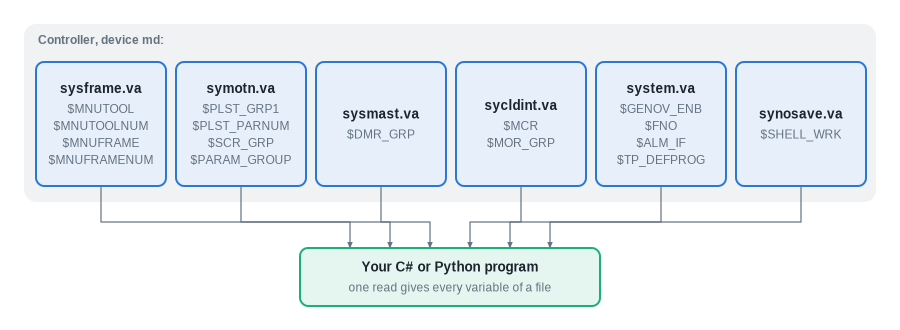
Read them from a PC
parameters.Snpx.Enable = true;robot.Connect(parameters);// One FTP read per .va file gives all its variables, typedSysframeFile frames = robot.Ftp.KnownVariableFiles.GetSysframeFile();SymotnFile motion = robot.Ftp.KnownVariableFiles.GetSymotnFile();SycldintFile cycle = robot.Ftp.KnownVariableFiles.GetSycldintFile();SystemFile system = robot.Ftp.KnownVariableFiles.GetSystemFile();// .NET arrays start at 0: $MNUTOOLNUM[1] is Mnutoolnum[0]int activeTool = frames.Mnutoolnum[0];int activePayload = motion.PlstParnum[0];string model = motion.ScrGrp[0].RobotModel;int generalOverride = cycle.Mcr.Genoverride;string fNumber = system.Fno;// One variable by name, live (SNPX)int overrideNow = robot.Snpx.IntegerSystemVariables.Read("$MCR.$GENOVERRIDE");}}
| Way | Use it for | Page |
|---|---|---|
| SNPX, by name | A few values read often (about 2 ms) | SNPX system variables |
| CGTP or Telnet KCL, by name | Any variable, also structures | CGTP registers & variables, Telnet variables |
FTP or CGTP, KnownVariableFiles | All the variables of a file at once, typed | Diagnostics & variables |
Fanuc counts from 1, .NET and Python from 0: $MNUTOOL[1,3] is Mnutool[0, 2] in C#. In Python, a two dimension array like $MNUTOOL is one flat list, group 1 first. A variable that the file does not hold is null, and so is a position that reads Uninitialized.
The .va listing also gives the access of each variable (Access: RW or Access: RO). Open the file in a text editor to check it on your controller.
Tool and user frames: sysframe.va
| Variable | Type | Meaning | SDK property |
|---|---|---|---|
$MNUTOOL[g,n] | POSITION | Tool frame n of group g (X, Y, Z, W, P, R), n from 1 to 10 on a standard controller | GetSysframeFile().Mnutool |
$MNUTOOLNUM[g] | BYTE | Number of the active tool of group g | GetSysframeFile().Mnutoolnum |
$MNUFRAME[g,n] | POSITION | User frame n of group g, n from 1 to 9 on a standard controller | GetSysframeFile().Mnuframe |
$MNUFRAMENUM[g] | BYTE | Number of the active user frame of group g | GetSysframeFile().Mnuframenum |
Details: Tool frames, User frames.
Payload: symotn.va
| Variable | Type | Meaning | SDK property |
|---|---|---|---|
$PLST_GRP1[n] | PLST_GRP_T | Payload schedule n of group 1: $COMMENT, $PAYLOAD, $PAYLOAD_X, _Y, _Z, $PAYLOAD_IX, _IY, _IZ. The digit is the group | GetSymotnFile().PlstGrp1 to PlstGrp5 |
$PLST_PARNUM[g] | INTEGER | Active payload schedule of group g | GetSymotnFile().PlstParnum |
Details: Payload schedules.
Speed override: sycldint.va and system.va
| Variable | Type | Meaning | SDK property |
|---|---|---|---|
$MCR.$GENOVERRIDE | INTEGER | General override, the % of the pendant, 1 to 100 | GetSycldintFile().Mcr.Genoverride |
$GENOV_ENB | BOOLEAN | FALSE locks the +% and -% keys of the pendant | GetSystemFile().GenovEnb |
Details: Speed override.
Mastering: sysmast.va
| Variable | Type | Meaning | SDK property |
|---|---|---|---|
$DMR_GRP[g].$MASTER_COUN[a] | INTEGER | Master count of axis a | GetSysmastFile().DmrGrp[g - 1].MasterCoun |
$DMR_GRP[g].$MASTER_DONE | BOOLEAN | Mastering done | GetSysmastFile().DmrGrp[g - 1].MasterDone |
Details: Mastering data.
Robot and program: symotn.va, system.va, synosave.va
| Variable | Type | Meaning | SDK property |
|---|---|---|---|
$SCR_GRP[g].$ROBOT_MODEL | STRING | Model of the robot of group g | GetSymotnFile().ScrGrp[g - 1].RobotModel |
$SCR.$NUM_GROUP | BYTE | Number of motion groups | GetSymotnFile().Scr.NumGroup |
$FNO | STRING | F number of the robot | GetSystemFile().Fno |
$APPLICATION[i] | STRING | Application software and its version | GetSystemFile().Application |
$SHELL_WRK.$ROUT_NAME | STRING | Selected program. Not always the one that runs | GetSynosaveFile().ShellWrk.RoutName |
$SHELL_WRK.$CURR_LINE | INTEGER | Current line | GetSynosaveFile().ShellWrk.CurrLine |
$TP_DEFPROG | STRING | Program opened on the pendant. It follows what the operator opens | GetSystemFile().TpDefprog |
$ALM_IF.$LAST_ALM | STRING | Last alarm | GetSystemFile().AlmIf.LastAlm |
To follow the programs that run, prefer Monitor task execution.
Limits and motors: symotn.va, sycldint.va
| Variable | Type | Meaning | SDK property |
|---|---|---|---|
$PARAM_GROUP[g].$UPPERLIMS[a], $LOWERLIMS[a] | REAL | Soft limits of each axis. A new value needs a restart of the controller | GetSymotnFile().ParamGroup[g - 1].Upperlims, Lowerlims |
$PARAM_GROUP[g].$SV_OFF_ENB[a] | BOOLEAN | Must be FALSE for Stream Motion, otherwise MOTN-615 | GetSymotnFile().ParamGroup[g - 1].SvOffEnb |
$MOR_GRP[g].$TEMPERATURE[a] | INTEGER | Temperature of each motor, in % of its maximum. Reads 0 in ROBOGUIDE | GetSycldintFile().MorGrp[g - 1].Temperature |
Cautions
- Reading is safe. Writing a system variable changes the robot at once: a tool frame moves every point taught with it, an override changes the cycle time.
- None of these variables is a safety function. For the safety of people, use the safety functions of the controller (DCS).
sysframeandsysmastbelong to one robot. Never load them on another robot.- Some variables do not exist on every controller or software version. Open the
.vafile of your controller when a property isnull.
Integrator guides
- Tool frames: $MNUTOOL and $MNUTOOLNUM
- User frames: $MNUFRAME and the active UFRAME
- Back up and compare the frames of a fleet
- Speed override: $MCR.$GENOVERRIDE
- Save the mastering data ($DMR_GRP)
- Check the payload schedules
See also
- Read & write system variables: every protocol, with writing
- Offline file parsing: read the
.vafiles of a backup in .NET - Upload, download & backup files