Forward & Inverse Kinematics
Perform forward and inverse kinematics calculations offline for FANUC industrial robots and CRX cobots using DH parameters.
- Industrial arms and cobots
- Two solvers
- Choice of the solver
- Offline kinematics
- Run forward kinematics (FK)
- Solve inverse kinematics (IK) for an OPW robot
- Solve inverse kinematics (IK) for a CRX cobot
- Build DH parameters from multiple sources
- Tips
- Kinematics on the controller
- Forward kinematics using SNPX position registers
- Inverse kinematics using SNPX position registers
- Demonstration
- Online 3D tool
- Demo application
- Reference
This page shows how to compute the forward and inverse kinematics of FANUC industrial arms and CRX cobots with the Fanuc SDK, offline or with the controller. Inverse kinematics (IK) and forward kinematics (FK) let you move between joint space and Cartesian space. FK computes the tool pose from known joint angles, while IK finds joint angles for a desired pose. The kinematics utilities in the Fanuc SDK are offline helpers: you can evaluate poses and joint solutions without connecting to a controller, for simulation, path validation and checks before deployment.
Industrial arms and cobots
Two solvers
The SDK has two analytical solvers and chooses the right one:
- OPW industrial arms: Classical 6-axis Fanuc robots with an ortho-parallel base and spherical wrist, based on the paper
An Analytical Solution of the Inverse Kinematics Problem of Industrial Serial Manipulators with an Ortho-parallel Basis and a Spherical Wristby Mathias Brandstötter, Arthur Angerer, and Michael Hofbaur. - CRX collaborative arms: Fanuc CRX cobots that have their own closed-form solver and optional dual solutions, based on paper
Geometric Approach for Inverse Kinematics of the FANUC CRX Collaborative Robotby Manel Abbes and Gérard Poisson.
Choice of the solver
KinematicsUtils.InverseKinematics() reads DhParameters.KinematicsCategory:
KinematicsCategory.Opw: it callsOpw.OpwKinematicsUtils.InverseKinematics(industrial robots).KinematicsCategory.Crx: it callsCrx.CrxKinematicsUtils.InverseKinematics(CRX cobots).
So one entry point covers every arm.
Offline kinematics
Run forward kinematics (FK)
static void Main(){// Load robot geometryvar dh = DhParameters.FromArmKinematicModel(ArmKinematicModels.CRX10iA);// Joint angles in degrees (Fanuc convention)var jointsDeg = new JointsPosition { J1 = 0, J2 = -30, J3 = 45, J4 = 0, J5 = 60, J6 = 90 };// Compute pose: returns XYZ + WPRCartesianPosition pose = KinematicsUtils.ForwardKinematics(jointsDeg, dh);}}
Solve inverse kinematics (IK) for an OPW robot
static void Main(){// OPW industrial robotvar dh = DhParameters.FromArmKinematicModel(ArmKinematicModels.ARCMate120iD);var target = new CartesianPosition { X = 800, Y = 0, Z = 450, W = 180, P = 0, R = 90 };JointsPosition[] solutions = KinematicsUtils.InverseKinematics(target, dh);// CRX cobot with dual solutionsvar dhCrx = DhParameters.FromArmKinematicModel(ArmKinematicModels.CRX10iAL);var targetCrx = new CartesianPosition { X = 400, Y = 250, Z = 650, W = 0, P = 90, R = 0 };JointsPosition[] crxSolutions = CrxKinematicsUtils.InverseKinematics(targetCrx, dhCrx,includeDuals: true);}}
Solve inverse kinematics (IK) for a CRX cobot
The CRX solver uses a closed-form geometric approach and returns all valid joint solutions directly. No seed position is required. Pass includeDuals: true (C#) or include_duals=True (Python) to also include the dual configurations defined by the CRX kinematics.
using UnderAutomation.Fanuc.Common;using UnderAutomation.Fanuc.Kinematics;using UnderAutomation.Fanuc.Kinematics.Crx;public class KinematicsIK{static void Main(){// OPW industrial robotvar dh = DhParameters.FromArmKinematicModel(ArmKinematicModels.ARCMate120iD);var target = new CartesianPosition { X = 800, Y = 0, Z = 450, W = 180, P = 0, R = 90 };JointsPosition[] solutions = KinematicsUtils.InverseKinematics(target, dh);// CRX cobot with dual solutionsvar dhCrx = DhParameters.FromArmKinematicModel(ArmKinematicModels.CRX10iAL);var targetCrx = new CartesianPosition { X = 400, Y = 250, Z = 650, W = 0, P = 90, R = 0 };JointsPosition[] crxSolutions = CrxKinematicsUtils.InverseKinematics(targetCrx, dhCrx,includeDuals: true);}}
Build DH parameters from multiple sources
- Built-in catalog:
DhParameters.FromArmKinematicModel(ArmKinematicModels model)gives the geometry of many Fanuc arms and cobots. - ROBOGUIDE library:
DhParameters.FromDefFile(path)parses robot definitions inProgramData/FANUC/ROBOGUIDE/Robot Library. - Controller variables:
DhParameters.FromSymotnFileandDhParameters.FromMrrGrpconvert live$MRR_GRPorsymotn.vadata to reusable DH structures. - OPW data:
DhParameters.FromOpwParametersmaps OPW parameters (meters) to Fanuc-style DH while keeping the kinematics category consistent.
Tips
- Offline: the solvers need no controller and no connection.
- Pose normalization:
OpwKinematicsUtils.InverseKinematicsnormalizes angles to(-180, 180]to match Fanuc expectations. - CRX dual solutions: Pass
includeDuals: truetoCrxKinematicsUtils.InverseKinematicsto include the additional configurations defined by the CRX kinematics model. - Matrix helpers:
KinematicsUtils.Mulmultiplies 2D matrices if you need to compose transforms manually.
Kinematics on the controller
With a connection, the controller can compute the kinematics, without DH parameters. The controller keeps the joint and the Cartesian form of every position register. Write a position in one form with SNPX, then read the same register back to get the other form.
Forward kinematics using SNPX position registers
Write joint angles and read back the Cartesian pose:
FanucRobot _robot = new FanucRobot();_robot.Connect("192.168.0.1");// Forward kinematics via SNPX: joints → CartesianJointsPosition jointsPosition = new JointsPosition(10, 12, 50, 20, 12, 16);_robot.Snpx.PositionRegisters.Write(1, jointsPosition);CartesianPosition cartesianPosition = _robot.Snpx.PositionRegisters.Read(1).CartesianPosition;// Inverse kinematics via SNPX: Cartesian → jointsCartesianPosition targetPosition = new CartesianPosition() { X = 100, Y = 100, Z = 100 };targetPosition.Configuration.WristFlip = WristFlip.Flip;targetPosition.Configuration.ArmUpDown = ArmUpDown.Down;targetPosition.Configuration.ArmLeftRight = ArmLeftRight.Left;_robot.Snpx.PositionRegisters.Write(1, targetPosition);JointsPosition resultJoints = _robot.Snpx.PositionRegisters.Read(1).JointsPosition;}}
Inverse kinematics using SNPX position registers
Write a Cartesian pose and read back the joint angles. There is only one solution, because the Cartesian position contains the configuration.
Demonstration
Online 3D tool
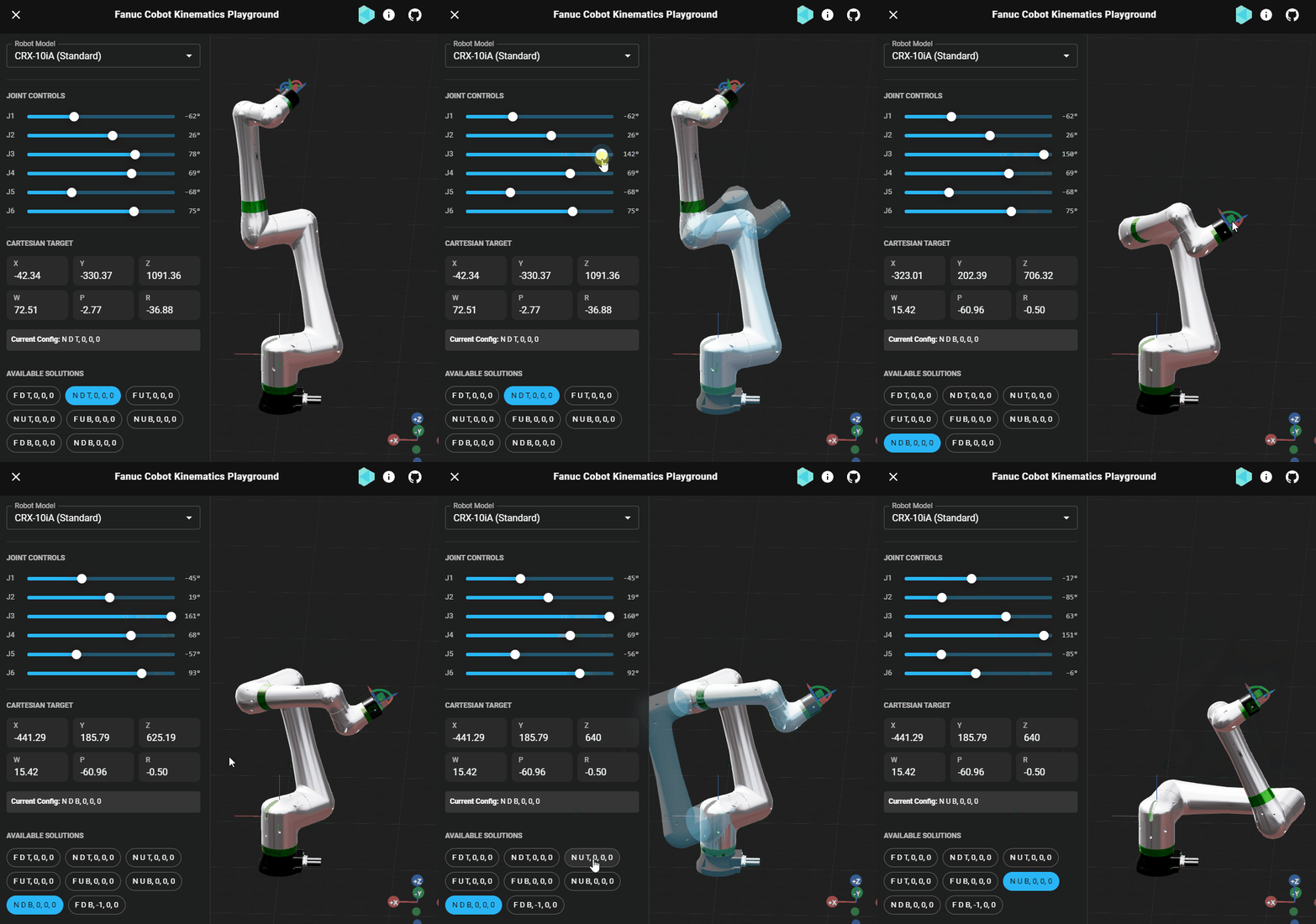
fanuc-kinematics.underautomation.com is a 3D page to try the forward and inverse kinematics of the FANUC arms and cobots.
Demo application
Everything on this page can be tried without writing code, in the Forward & Invert Kinematics page of the demo application.
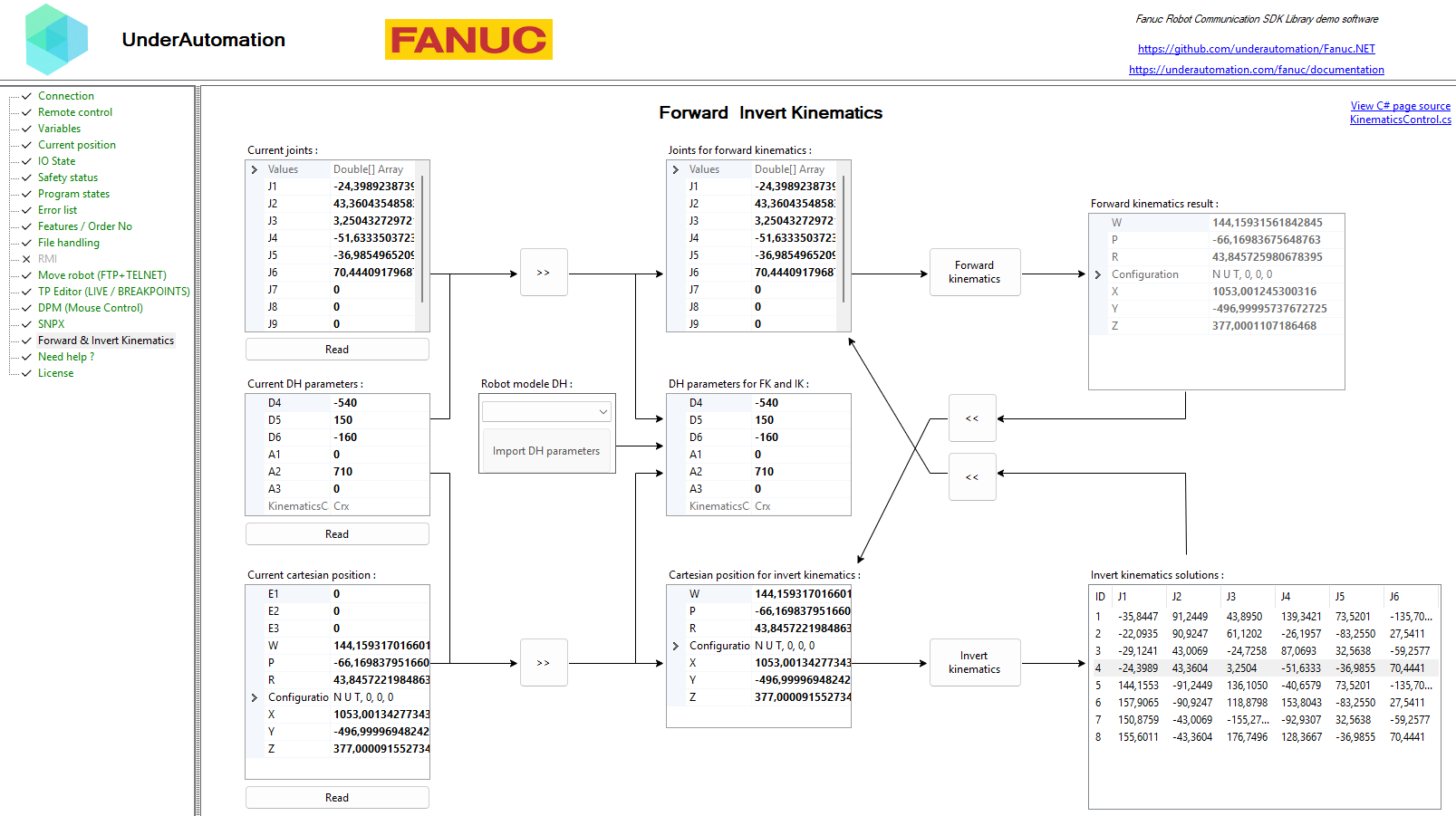
The demo application is open source. The C# source of this page is KinematicsControl.cs.
Reference
Kinematics utilities
| Member | Type | Description |
|---|---|---|
ForwardKinematics(double[], DhParameters) Method static | CartesianPosition | Compute FK for given joint angles (rad) and DH parameters |
ForwardKinematics(JointsPosition, DhParameters) Method static | CartesianPosition | Compute FK for given joint angles (deg) and DH parameters |
InverseKinematics(CartesianPosition, DhParameters) Method static | JointsPosition[] | Compute all inverse kinematics solutions for a desired end effector pose.
|
Mul(double[,], double[,]) Method static | double[,] | Multiply two 4x4 homogeneous transformation matrices.
|
Denavit-Hartenberg parameters for a 6-axis robot arm.
| Member | Type | Description |
|---|---|---|
DhParameters() Constructor | Initializes a new empty instance of DhParameters. | |
DhParameters(double, double, double, double, double, double) Constructor | Initializes a new instance of DhParameters with the specified values.
| |
DhParameters(IDhParameters) Constructor | Initializes a new instance of DhParameters by copying from an existing IDhParameters.
| |
A1 Property | double | DH parameter A1 (mm). |
A2 Property | double | DH parameter A2 (mm). |
A3 Property | double | DH parameter A3 (mm). |
D4 Property | double | DH parameter D4 (mm). |
D5 Property | double | DH parameter D5 (mm). |
D6 Property | double | DH parameter D6 (mm). |
KinematicsCategory Property read only | KinematicsCategory | Gets the kinematics category determined from the DH parameter values. |
Tag Field | object | User-defined tag for associating additional data with this instance. |
Equals(object) Method | bool | |
FromArmKinematicModel(string) Method static | DhParameters | Returns DH parameters from a known Arm Kinematic Model name. Returns null if not found in enum ArmKinematicModels. |
FromArmKinematicModel(ArmKinematicModels) Method static | DhParameters | Returns DH parameters from a known Arm Kinematic Model. |
FromDefFile(string) Method static | DhParameters[] | Loads DH parameters of each robots described in a ROBOGUIDE definition file (*.def). By default, this file is located in "C:\ProgramData\FANUC\ROBOGUIDE\Robot Library". |
FromDefFile(XDocument) Method static | DhParameters[] | Loads DH parameters of each robots described in a ROBOGUIDE definition file (*.def). By default, this file is located in "C:\ProgramData\FANUC\ROBOGUIDE\Robot Library". |
FromMrrGrp(MrrGrpVariableType) Method static | DhParameters | Loads DH parameters from parsed variable $MRR_GRP located in symotn.va. |
FromOpwParameters(double, double, double, double, double) Method static | DhParameters | Creates DH parameters from OPW parameters (in meters) C1 and B are ignored because B is always 0 and C1 is not used in the DH representation.
|
FromSymotnFile(SymotnFile) Method static | DhParameters[] | Loads DH parameters of each group from a parsed symotn.va file. |
GetHashCode() Method | int | |
ToString() Method | string |
Category of kinematics model for a robot arm.
| Name | Value | Description |
|---|---|---|
Crx | 1 | CRX collaborative robot kinematics. |
Invalid | 0 | Invalid or unsupported kinematics configuration. |
Opw | 2 | OPW (ortho-parallel wrist) kinematics for standard industrial robots. |
Interface defining the Denavit-Hartenberg parameters for a 6-axis robot arm.
| Member | Type | Description |
|---|---|---|
A1 Property read only | double | DH parameter A1 (mm). |
A2 Property read only | double | DH parameter A2 (mm). |
A3 Property read only | double | DH parameter A3 (mm). |
D4 Property read only | double | DH parameter D4 (mm). |
D5 Property read only | double | DH parameter D5 (mm). |
D6 Property read only | double | DH parameter D6 (mm). |
Joints position in degrees
| Member | Type | Description |
|---|---|---|
JointsPosition() Constructor | Default constructor | |
JointsPosition(double, double, double, double, double, double) Constructor | Constructor with 6 joint values in degrees | |
JointsPosition(double, double, double, double, double, double, double, double, double) Constructor | Constructor with 9 joint values in degrees | |
JointsPosition(double[]) Constructor | Constructor from an array of joint values in degrees | |
this[int] Property | double | Gets or sets the joint value at the specified index |
J1 Property | double | Joint 1 in degrees |
J2 Property | double | Joint 2 in degrees |
J3 Property | double | Joint 3 in degrees |
J4 Property | double | Joint 4 in degrees |
J5 Property | double | Joint 5 in degrees |
J6 Property | double | Joint 6 in degrees |
J7 Property | double | Joint 7 in degrees |
J8 Property | double | Joint 8 in degrees |
J9 Property | double | Joint 9 in degrees |
Values Property read only | double[] | Numeric values for each joints |
Equals(object) Method | bool | |
GetHashCode() Method | int | |
IsNear(JointsPosition, JointsPosition, double) Method static | bool | Check if joints position is near to expected joints position with a tolerance value |
ToString() Method | string |
Fanuc cartesian position and rotations
| Member | Type | Description |
|---|---|---|
CartesianPosition() Constructor | Default constructor | |
CartesianPosition(double, double, double, double, double, double) Constructor | Constructor with position and rotations | |
CartesianPosition(double, double, double, double, double, double, Configuration) Constructor | Constructor with position, rotations and configuration | |
CartesianPosition(CartesianPosition) Constructor | Copy constructor | |
CartesianPosition(XYZPosition, double, double, double) Constructor | Constructor from an XYZ position with rotations | |
Configuration Property | Configuration | Position configuration |
Equals(object) Method | bool | |
FromHomogeneousMatrix(double[,]) Method static | CartesianPosition | Create a CartesianPosition with unknow configuration from a homogeneous rotation and translation 4x4 matrix
|
GetHashCode() Method | int | |
IsNear(CartesianPosition, CartesianPosition, double, double) Method static | bool | Check if two Cartesian positions are near each other within specified tolerances |
NormalizeAngle(double) Method static | double | Normalize an angle to the range ]-180, 180] |
NormalizeAngles(CartesianPosition) Method static | void | Normalize the W, P, R angles to the range ]-180, 180] |
ToString() Method | string |