Controllers and configuration files
The global file and the .touchup folders, which one wins, the passwords in the OS keychain, and a list of controllers shared as a CSV file.
TouchUp keeps the list of your controllers in JSON files, without a project. This page explains where these files are, which one wins, where the passwords are kept and how to share a list of controllers with a CSV file.
Where the controllers are declared
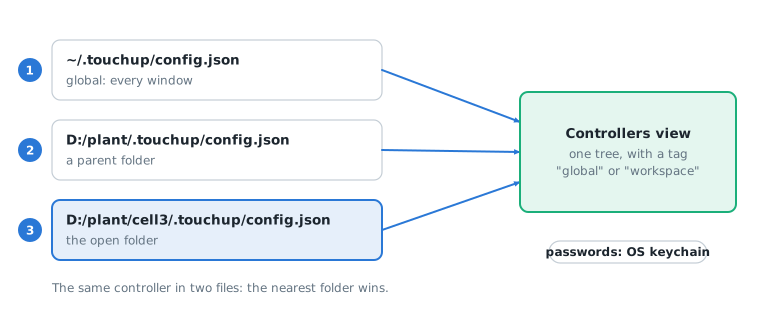
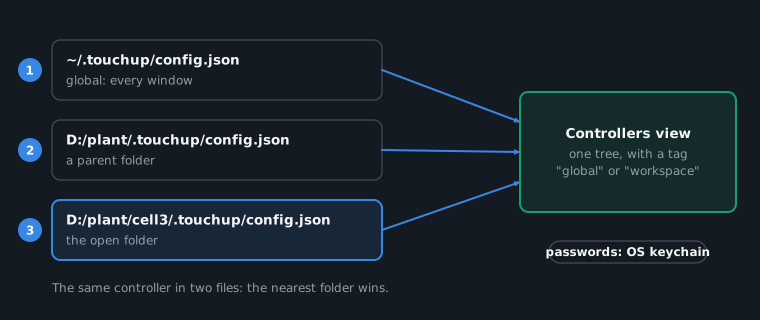
| Scope | File | Use |
|---|---|---|
| Global | ~/.touchup/config.json in your user folder | The controllers shown in every window, and your preferences (the last backup folder, the notifications, how often TouchUp reads a controller) |
| Workspace | .touchup/config.json in the open folder, and in each parent folder | The controllers of a project or of a cell folder. The file can be committed to Git |
The Controllers view shows two lists, Workspace and Global, and you can drag a controller to reorder it or to move it from one file to the other: see Order the controllers. When a controller is in two files, the file of the nearest folder wins.
A window without an open folder works: the guide Add a controller then writes to the global file.
Edit a configuration file
Edit Controller opens the file of the controller in the editor. TouchUp checks each file with its JSON schema: the editor completes the keys and underlines an error, and the Controllers view shows a file it cannot read.
A controller has an id, a name, a brand and an address. The options of the protocols of the brand are optional: TouchUp uses the default of each one.
A path in a workspace file, for example the robot.ini of a Fanuc controller ("winolpc": { "config": "../tools/robot.ini" }), is saved relative to the .touchup folder when it is inside the workspace: the file can be committed and shared. A path outside the workspace, and any path of the global file, is absolute. See Choose a robot.ini.
Passwords
No password is written in a configuration file. TouchUp keeps them in the keychain of the operating system (Windows Credential Manager, the Secret Service on Linux).
When the address of a controller changes in a file, TouchUp asks before it sends the saved password to the new address.
Share a list of controllers
Export
TouchUp: Export Controllers to CSV writes the controllers to a CSV file, one row per controller: id, name, brand, address, and the options and groups as JSON. Passwords are never exported.
Import
TouchUp: Import Controllers from CSV reads such a file and adds its controllers to the configuration file you choose. A controller already declared (same id) is skipped, a row with an error is reported in the TouchUp output. The imported controllers have no password: set it with Edit Controller when the controller needs one.
Preferences
The global file can also hold a preferences block. TouchUp checks it with the same schema, so the editor completes it.
{"preferences": {"pollingMs": { "status": 1000, "alarms": 2000, "tasks": 1000 },"notifications": { "batteryAlarm": false }}}
| Key | Use |
|---|---|
backup.lastFolder | The last folder you chose for a backup. TouchUp writes it for you |
notifications | alarmRaised, connectionLost and batteryAlarm: the default of the notifications, see Alarms and logs |
pollingMs | How often TouchUp reads a connected controller, see below |
A setting that you changed in the settings of the editor wins over the same key of the file.
How often TouchUp reads a controller
A connected controller is read at a fixed period. The default is enough for most cells. Slow it down for a controller on a weak network, or speed it up to follow a value closely.
Key in preferences.pollingMs | Setting of the editor | What is read | Default |
|---|---|---|---|
status | touchup.pollingMs.status | The status of the controller | 1000 ms |
alarms | touchup.pollingMs.alarms | The active alarms | 2000 ms |
tasks | touchup.pollingMs.tasks | The tasks (see the Tasks node) | 1000 ms |
- Each period goes from 200 to 60000 milliseconds.
- A value outside this range is not used: the default stays, a warning names the value, and the rest of the file still loads.
- A setting
touchup.pollingMs.*that you changed wins over the file. - The periods are read when a controller connects. To apply a new one, disconnect the controller and connect it again.