SSH Linux commands
Run Linux commands on the controller of a UR cobot with SSH, one by one or in a shell that keeps its session.
The controller of a Universal Robots cobot runs Linux. With SSH (Secure Shell), the SDK runs Linux commands on it, one by one or in a shell that keeps its session. This page shows both. To transfer files, see SFTP.
Prerequisites
- Secure Shell is enabled on the robot. On PolyScope, open
Settings,Security,Secure Shell. - The Linux user and its password:
rooton a robot,uron URSim,easybotby default. The SDK usesurandeasybotwhen you set nothing.
A command runs with the rights of this user. A wrong command can stop the controller: test it on URSim first.
Run a command
SSH is disabled by default: set Ssh.EnableSsh in ConnectParameters. RunCommand runs a command and waits for its end. The returned SshCommand holds its output and its exit status.
static void Main(string[] args){var robot = new UR();var parameters = new ConnectParameters("192.168.0.1");// SSH is disabled by defaultparameters.Ssh.EnableSsh = true;// "ur" and "easybot" by defaultparameters.Ssh.Username = "root";parameters.Ssh.Password = "easybot";robot.Connect(parameters);// Run a command and wait for its endSshCommand command = robot.Ssh.RunCommand("df -h /programs");string output = command.Result; // standard outputint exitStatus = command.ExitStatus;}}
SshClient also works without UR: new SshClient(), then Connect(ip, username, password).
Open a shell
A shell keeps its session and its working directory, like a terminal. CreateShellStream opens one, with a terminal name, a size and a buffer size. DataReceived is raised when the shell writes text.
robot.Connect(parameters);// A shell keeps its session and its working directory, like a terminal.// Terminal name, columns, rows, width, height, buffer sizeShellStream shell = robot.Ssh.CreateShellStream("xterm", 80, 24, 800, 600, 1024);// Raised for each text written by the shellshell.DataReceived += (sender, e) => Console.Write(e.Line);shell.WriteLine("cd /programs");shell.WriteLine("ls -l");}}
Try it in the demo application
Everything on this page can be tried without writing code, in the Linux commands (SSH) page of the demo application.
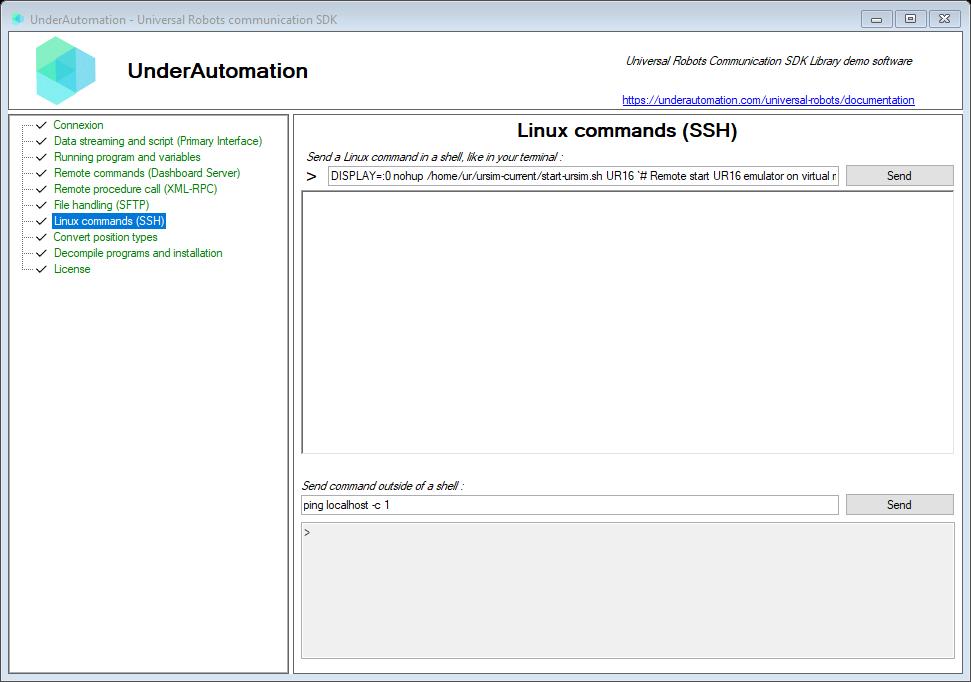
The demo application is open source. The C# source of this page is SshControl.cs.
Reference
Provides a client connection to SSH server
| Member | Type | Description |
|---|---|---|
SshClient() Constructor | ||
Connect(string, string, string, int) Method | void | Connects to the robot
|
Contains operation for working with SSH Shell.
| Member | Type | Description |
|---|---|---|
CanRead Property read only | bool | Gets a value indicating whether the current stream supports reading. |
CanSeek Property read only | bool | Gets a value indicating whether the current stream supports seeking. |
CanWrite Property read only | bool | Gets a value indicating whether the current stream supports writing. |
DataAvailable Property read only | bool | Gets a value that indicates whether data is available on the ShellStream to be read. |
Length Property read only | long | Gets the length in bytes of the stream. |
Position Property | long | Gets or sets the position within the current stream. |
DataReceived Event | EventHandler<ShellDataEventArgs> | Occurs when data was received. |
ErrorOccurred Event | EventHandler<ExceptionEventArgs> | Occurs when an error occurred. |
BeginExpect(AsyncCallback, object, params ExpectAction[]) Method | IAsyncResult | Begins the expect.
|
BeginExpect(AsyncCallback, params ExpectAction[]) Method | IAsyncResult | Begins the expect.
|
BeginExpect(TimeSpan, AsyncCallback, object, params ExpectAction[]) Method | IAsyncResult | Begins the expect.
|
BeginExpect(params ExpectAction[]) Method | IAsyncResult | Begins the expect.
|
Dispose(bool) Method | void | Releases the unmanaged resources used by the Stream and optionally releases the managed resources.
|
EndExpect(IAsyncResult) Method | string | Ends the execute.
|
Expect(string) Method | string | Expects the expression specified by text.
|
Expect(string, TimeSpan) Method | string | Expects the expression specified by text.
|
Expect(Regex) Method | string | Expects the expression specified by regular expression.
|
Expect(Regex, TimeSpan) Method | string | Expects the expression specified by regular expression.
|
Expect(TimeSpan, params ExpectAction[]) Method | void | Expects the specified expression and performs action when one is found.
|
Expect(params ExpectAction[]) Method | void | Expects the specified expression and performs action when one is found.
|
Flush() Method | void | Clears all buffers for this stream and causes any buffered data to be written to the underlying device. |
Read() Method | string | Reads text available in the shell. |
Read(byte[], int, int) Method | int | Reads a sequence of bytes from the current stream and advances the position within the stream by the number of bytes read.
|
ReadLine() Method | string | Reads the line from the shell. If line is not available it will block the execution and will wait for new line. |
ReadLine(TimeSpan) Method | string | Reads a line from the shell. If line is not available it will block the execution and will wait for new line.
|
Seek(long, SeekOrigin) Method | long | This method is not supported.
|
SetLength(long) Method | void | This method is not supported.
|
Write(byte[], int, int) Method | void | Writes a sequence of bytes to the current stream and advances the current position within this stream by the number of bytes written.
|
Write(string) Method | void | Writes the specified text to the shell.
|
WriteLine(string) Method | void | Writes the line to the shell.
|
Represents SSH command that can be executed.
| Member | Type | Description |
|---|---|---|
CommandText Property read only | string | Gets the command text. |
CommandTimeout Property | TimeSpan | Gets or sets the command timeout. |
Error Property read only | string | Gets the command execution error. |
ExitStatus Property read only | int | Gets the command exit status. |
ExtendedOutputStream Property read only | Stream | Gets the extended output stream. |
OutputStream Property read only | Stream | Gets the output stream. |
Result Property read only | string | Gets the command execution result. |
BeginExecute() Method | IAsyncResult | Begins an asynchronous command execution. |
BeginExecute(AsyncCallback) Method | IAsyncResult | Begins an asynchronous command execution.
|
BeginExecute(AsyncCallback, object) Method | IAsyncResult | Begins an asynchronous command execution.
|
BeginExecute(string, AsyncCallback, object) Method | IAsyncResult | Begins an asynchronous command execution.
|
Dispose() Method | void | Performs application-defined tasks associated with freeing, releasing, or resetting unmanaged resources. |
Dispose(bool) Method | void | Releases unmanaged and - optionally - managed resources
|
EndExecute(IAsyncResult) Method | string | Waits for the pending asynchronous command execution to complete.
|
Execute() Method | string | Executes command specified by CommandText property. |
Execute(string) Method | string | Executes the specified command text.
|
~SshCommand() Method | void | Releases unmanaged resources and performs other cleanup operations before the SshCommand is reclaimed by garbage collection. |
Each method also exists in an asynchronous version, with the same name followed by Async and an optional cancellation token.