System information & energy
Read the RobotWare version, the installed options and products, the robot types of the system, and the energy consumption counters.
robot.Rws.System describes the system installed on the controller: its name and software version, the options and the products it was built with, the type of robot it drives, its license, and the energy it consumes. Everything here is read only, except the reset of the energy counter.
Do not confuse this service with Controller, which reports the identity of the controller hardware. System reports the software running on it.
System information
GetInfo returns a SystemInfo with the name of the system, the robot software version and the installed options.
AbbController robot = new AbbController();robot.Connect("192.168.0.1");SystemInfo info = robot.Rws.System.GetInfo();Console.WriteLine(info.Name); // name of the systemConsole.WriteLine(info.VersionName); // readable robot software versionConsole.WriteLine(info.Version);Console.WriteLine(info.SystemId); // unique identifier of the systemConsole.WriteLine(info.StartTime); // last start, null on some controllersConsole.WriteLine(info.OptionCount);// The options come with the description, no second call neededforeach (string option in info.Options)Console.WriteLine(option);robot.Disconnect();}
A virtual controller does not fill every field. The detailed version numbers, the build tag and the timestamps are usually empty on a simulated system, which is why they are nullable. The name, the version and the system identifier are always there.
The options are returned with the description, so GetOptions is not needed when you call GetInfo.
Options, products, robot types and license
| Method | Returns |
|---|---|
GetOptions() | string[], the names of the installed options |
GetProducts(name) | SystemProduct[], the installed software products with their versions |
GetRobotTypes() | string[], for example IRB 120-3/0.6 |
GetLicense() | string, the license the robot software runs under |
AbbController robot = new AbbController();robot.Connect("192.168.0.1");// Installed optionsforeach (string option in robot.Rws.System.GetOptions())Console.WriteLine(option);// Installed products and their versionsforeach (SystemProduct product in robot.Rws.System.GetProducts())Console.WriteLine($"{product.Name} {product.VersionName}");// One product only. The name must match exactlySystemProduct[] robotWare = robot.Rws.System.GetProducts("RobotWare");// Type of every robot the controller drivesforeach (string type in robot.Rws.System.GetRobotTypes())Console.WriteLine(type);// License the robot software runs underConsole.WriteLine(robot.Rws.System.GetLicense());Console.WriteLine(robotWare.Length);robot.Disconnect();
GetProducts takes an optional name to report a single product. The name has to match an installed product exactly, the controller rejects an unknown one with an error instead of returning an empty list. Call it without argument to get every product.
GetRobotTypes only reports standard ABB robots. Positioners, track motions and other mechanical units are left out. A controller that drives none of them returns an empty array, not an error. Use robot.Rws.MotionSystem.GetMechanicalUnits() when you need the complete list.
GetLicense returns VIRTUAL_USE on a RobotStudio virtual controller.
Energy consumption
GetEnergy returns the energy the controller consumed, for the current measurement interval and since the last reset, broken down per mechanical unit and per axis. Values are in joules.
AbbController robot = new AbbController();robot.Connect("192.168.0.1");SystemEnergy energy = robot.Rws.System.GetEnergy();// Always check this first, the other values mean nothing when it is falseif (!energy.IsMeasurementValid){Console.WriteLine($"No measurement available, state is {energy.State}");return;}Console.WriteLine($"Interval : {energy.IntervalEnergy} J over {energy.IntervalLength} s");Console.WriteLine($"Average power : {energy.AveragePower} W");Console.WriteLine($"Accumulated : {energy.AccumulatedEnergy} J since {energy.ResetTime}");// Breakdown per mechanical unit and per axisforeach (SystemEnergyMechanicalUnit unit in energy.MechanicalUnits){Console.WriteLine(unit.Name);foreach (SystemEnergyAxis axis in unit.Axes)Console.WriteLine($" axis {axis.Number} : {axis.IntervalEnergy} J");}robot.Disconnect();}
Check IsMeasurementValid first. The controller answers with a complete but meaningless measurement while it has nothing to report, and State then tells why. AveragePower is computed by the SDK from the interval energy and the interval length, in watts, and is null when one of the two is missing.
SystemEnergyState | Meaning |
|---|---|
NotPaused | Measurement is running |
Paused, Pausing, Resuming | Measurement is stopped or changing state |
Blocked | Measurement is blocked, no new value is produced |
GoingToSleep, Sleep | The controller is entering or in its low energy consumption mode |
Unknown | The state could not be determined |
Polling the energy
Reading the whole measurement is not cheap. GetEnergyChangeCount returns a single number the controller increments each time a new measurement is available. Poll that number, and read the measurement only when it moved.
AbbController robot = new AbbController();robot.Connect("192.168.0.1");int? lastCount = robot.Rws.System.GetEnergyChangeCount();while (true){Thread.Sleep(1000);// One small request. Read the whole measurement only when the counter movedint? count = robot.Rws.System.GetEnergyChangeCount();if (count == lastCount) continue;lastCount = count;SystemEnergy energy = robot.Rws.System.GetEnergy();Console.WriteLine($"{energy.TimeStamp} : {energy.AccumulatedEnergy} J");}}}
The same counter is also in SystemEnergy.ChangeCount. Both return null when the controller does not report it.
Reset the accumulated energy
ResetAccumulatedEnergy sets the accumulated counter back to zero. The energy counted before is lost, the controller keeps no history. The reset moment becomes the new reference reported by ResetTime. The energy of the current interval is not affected.
AbbController robot = new AbbController();robot.Connect("192.168.0.1");// The accumulated counter goes back to zero, the energy counted before is lostrobot.Rws.System.ResetAccumulatedEnergy();SystemEnergy energy = robot.Rws.System.GetEnergy();// ResetTime is now the reference of the accumulated energyConsole.WriteLine($"{energy.AccumulatedEnergy} J since {energy.ResetTime}");robot.Disconnect();}
Try it in the demo application
Everything on this page can be tried without writing code, in the System (RWS) page of the demo application.
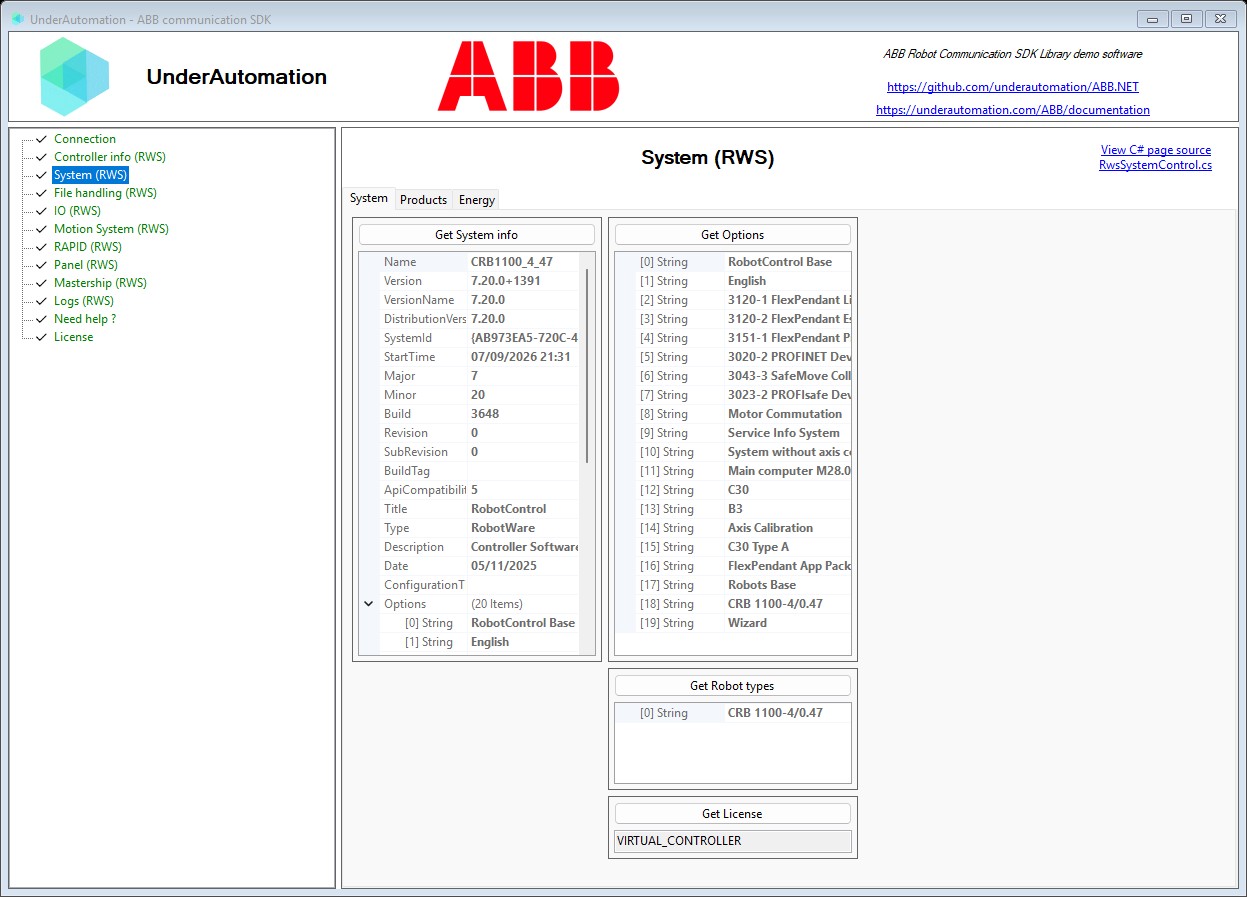
The demo application is open source. The C# source of this page is RwsSystemControl.cs.
API reference
Methods of SystemService :// Gets the energy the controller consumed, for the current interval and since the last reset (synchronous)SystemEnergy GetEnergy();// Gets the counter the controller increments each time a new energy measurement is available (synchronous)int? GetEnergyChangeCount();// Gets the name, the software version and the installed options of the system (synchronous)SystemInfo GetInfo();// Gets the license the robot software runs under (synchronous)string GetLicense();// Gets the options installed on the system (synchronous)string[] GetOptions();// Gets the software products installed on the controller, with their versions (synchronous)SystemProduct[] GetProducts(string name = null);// Gets the type of every robot the controller drives (synchronous)string[] GetRobotTypes();// Sets the accumulated energy counter of the controller back to zero (synchronous)void ResetAccumulatedEnergy();
Every method also exists in an asynchronous version, with the same name followed by Async and an optional CancellationToken.
Identity and software version of the system running on the controller. Returned by SystemService.GetInfo().
| Member | Type | Description |
|---|---|---|
SystemInfo() Constructor | Initializes a new instance of the SystemInfo class | |
ApiCompatibilityRevision Property | int? | Revision of the programming interface the system is compatible with, null when the controller did not report it |
Build Property | int? | Build number of the version, null when the controller did not report it |
BuildTag Property | string | Free text describing the build the system was produced by, null when the controller did not report it |
ConfigurationTimestamp Property | string | Timestamp of the configuration the system was built with, as the controller spells it. Null when the controller did not report it, which is the usual case on a virtual controller. |
Date Property | DateTime? | Date the system was produced, null when the controller did not report it |
Description Property | string | Description of the system, null when the controller did not report it |
DistributionVersion Property | string | Version of the software distribution the system was installed from. Null when the controller does not report it. |
Major Property | int? | Major number of the version, null when the controller did not report it |
Minor Property | int? | Minor number of the version, null when the controller did not report it |
Name Property | string | Name of the system installed on the controller |
OptionCount Property read only | int | Number of options installed on the system |
Options Property | string[] | Options installed on the system, in the order the controller reports them |
Revision Property | int? | Revision number of the version, null when the controller did not report it |
StartTime Property | DateTime? | Moment the system was last started, null when the controller did not report it |
SubRevision Property | int? | Sub revision number of the version, null when the controller did not report it |
SystemId Property | string | Unique identifier of the system |
Title Property | string | Title of the system, null when the controller did not report it |
Type Property | string | Type of the system, null when the controller did not report it |
Version Property | string | Version of the robot software the system runs |
VersionName Property | string | Human readable version of the robot software the system runs |
ToString() Method | string | Returns a string representation of this system |
One software product installed on the controller. Returned by SystemService.GetProducts().
| Member | Type | Description |
|---|---|---|
SystemProduct() Constructor | Initializes a new instance of the SystemProduct class | |
Name Property | string | Name of the product, for example "RobotWare" or "RobotControl" |
Version Property | string | Full version of the product, build information included. Null when the controller only reports the version name. |
VersionName Property | string | Human readable version of the product |
ToString() Method | string | Returns a string representation of this product |
Energy the controller has consumed, for the current measurement interval and since the last reset. Returned by SystemService.GetEnergy().
| Member | Type | Description |
|---|---|---|
SystemEnergy() Constructor | Initializes a new instance of the SystemEnergy class | |
AccumulatedEnergy Property | double? | Total energy consumed since the last reset, in joules, null when the controller did not report it |
AveragePower Property read only | double? | Average power consumed during the current measurement interval, in watts. Null when the interval energy or the interval length is missing, or when the interval is empty. |
ChangeCount Property | int? | Counter the controller increments every time a new measurement is available. Comparing it with the previous one tells whether the values changed without reading them all. |
IntervalEnergy Property | double? | Total energy consumed during the current measurement interval, in joules, null when the controller did not report it |
IntervalLength Property | int? | Length of the measurement interval in seconds, which the average power is computed from, null when the controller did not report it |
IsMeasurementValid Property | bool | Whether the reported measurement is valid. When false, every energy value of this instance is meaningless and the measurement has to be read again later. |
MechanicalUnitCount Property read only | int | Number of mechanical units the controller reported |
MechanicalUnits Property | SystemEnergyMechanicalUnit[] | Energy consumed by each mechanical unit during the current measurement interval |
ResetTime Property | DateTime? | Moment the accumulated energy was last reset, null when the controller did not report it |
State Property | SystemEnergyState | State of the energy measurement |
TimeStamp Property | DateTime? | Moment the measurement was taken, null when the controller did not report it |
ToString() Method | string | Returns a string representation of this measurement |
Energy consumed by one mechanical unit, broken down per axis. Held by SystemEnergy.
| Member | Type | Description |
|---|---|---|
SystemEnergyMechanicalUnit() Constructor | Initializes a new instance of the SystemEnergyMechanicalUnit class | |
Axes Property | SystemEnergyAxis[] | Energy consumed by each axis of the mechanical unit during the current measurement interval |
AxisCount Property read only | int | Number of axes the controller reported for this mechanical unit |
Name Property | string | Name of the mechanical unit, for example "ROB_1" |
ToString() Method | string | Returns a string representation of this mechanical unit |
Energy consumed by one axis of a mechanical unit during the current measurement interval. Held by SystemEnergyMechanicalUnit.
| Member | Type | Description |
|---|---|---|
SystemEnergyAxis() Constructor | Initializes a new instance of the SystemEnergyAxis class | |
IntervalEnergy Property | double? | Energy the axis consumed during the current measurement interval, in joules, null when the controller did not report it |
Number Property | int | Number of the axis inside its mechanical unit, starting at 1 |
ToString() Method | string | Returns a string representation of this axis |
State of the energy measurement of the controller
| Name | Value | Description |
|---|---|---|
Blocked | 1 | Energy measurement is blocked and no new value is produced |
GoingToSleep | 6 | The controller is entering its low energy consumption mode |
NotPaused | 3 | Energy measurement is running |
Paused | 2 | Energy measurement is paused |
Pausing | 5 | Energy measurement is being paused |
Resuming | 4 | Energy measurement is being resumed |
Sleep | 7 | The controller is in its low energy consumption mode |
Unknown | 0 | The energy state could not be determined |