SFTP file handling
Download, upload, list, rename and delete the files of a UR controller with SFTP: programs, installations and any other file.
SFTP (SSH File Transfer Protocol) gives access to the files of a Universal Robots controller: download, upload, list, rename and delete programs, installations and any other file. This page shows how to connect and use the SFTP client of the SDK. The controller runs Linux: the same connection can also run commands, see SSH.
Prerequisites
- Secure Shell is enabled on the robot. On PolyScope, open
Settings,Security,Secure Shell. - The Linux user and its password. The SDK uses
urandeasybotby default.
| Target | User | Password | Folder of the programs |
|---|---|---|---|
| Robot | root | easybot | /programs |
| URSim | ur | easybot | /home/ur/ursim-current/programs |
Change the default password of the robot: anyone on the network who knows it can change its files.
Example
SFTP is disabled by default: set Ssh.EnableSftp in ConnectParameters.
static void Main(string[] args){var robot = new UR();var parameters = new ConnectParameters("192.168.0.1");// SFTP is disabled by defaultparameters.Ssh.EnableSftp = true;// "ur" and "easybot" by defaultparameters.Ssh.Username = "root";parameters.Ssh.Password = "easybot";robot.Connect(parameters);// Download a program from the robotrobot.Sftp.DownloadFile("/programs/my_program.urp", @"C:\temp\my_program.urp");// Send a program to the robotrobot.Sftp.UploadFile(@"C:\temp\my_program.urp", "/programs/my_program.urp");// Rename, check, deleterobot.Sftp.RenameFile("/programs/my_program.urp", "/programs/old_program.urp");bool exists = robot.Sftp.Exists("/programs/old_program.urp");robot.Sftp.DeleteFile("/programs/old_program.urp");// List a folderforeach (SftpFile item in robot.Sftp.ListDirectory("/programs/"))Console.WriteLine(item.Name + " " + item.IsDirectory + " " + item.Length + " " + item.LastWriteTimeUtc);// Read and write text filesrobot.Sftp.WriteAllText("/programs/note.txt", "Hello");string text = robot.Sftp.ReadAllText("/programs/note.txt");}}
The progress callbacks of DownloadFile, UploadFile and ListDirectory are optional. In Python, pass a function that takes the number of bytes or of entries.
List the programs
EnumeratePrograms and EnumerateInstallations return the relative paths of the .urp and .installation files of the programs folder and of its subfolders. They look in /programs, or in the folder of URSim when /programs does not exist. The client also works without UR:
static void Main(string[] args){// An SFTP client, without a UR instancevar client = new SftpClient();client.Connect("192.168.0.1", "root", "easybot");// Relative paths of the .urp files of the programs folder, and of its subfoldersstring[] programs = client.EnumeratePrograms();string[] installations = client.EnumerateInstallations();client.Disconnect();}}
Operations
| Task | Methods |
|---|---|
| Transfer a file | DownloadFile, UploadFile, with a local path or a Stream |
| Read and write a file | ReadAllText, ReadAllLines, ReadAllBytes, WriteAllText, WriteAllLines, WriteAllBytes, AppendAllText, OpenRead, OpenWrite |
| Browse | ListDirectory, Exists, Get, GetAttributes, ChangeDirectory, WorkingDirectory |
| Change | CreateDirectory, RenameFile, DeleteFile, DeleteDirectory, Delete, ChangePermissions |
| Dates | GetLastWriteTime, GetLastAccessTime, and their UTC versions |
A program sent with SFTP is loaded with the Dashboard Server (LoadProgram) or the REST API. See Transfer files and backups.
Try it in the demo application
Everything on this page can be tried without writing code, in the File handling (SFTP) page of the demo application.
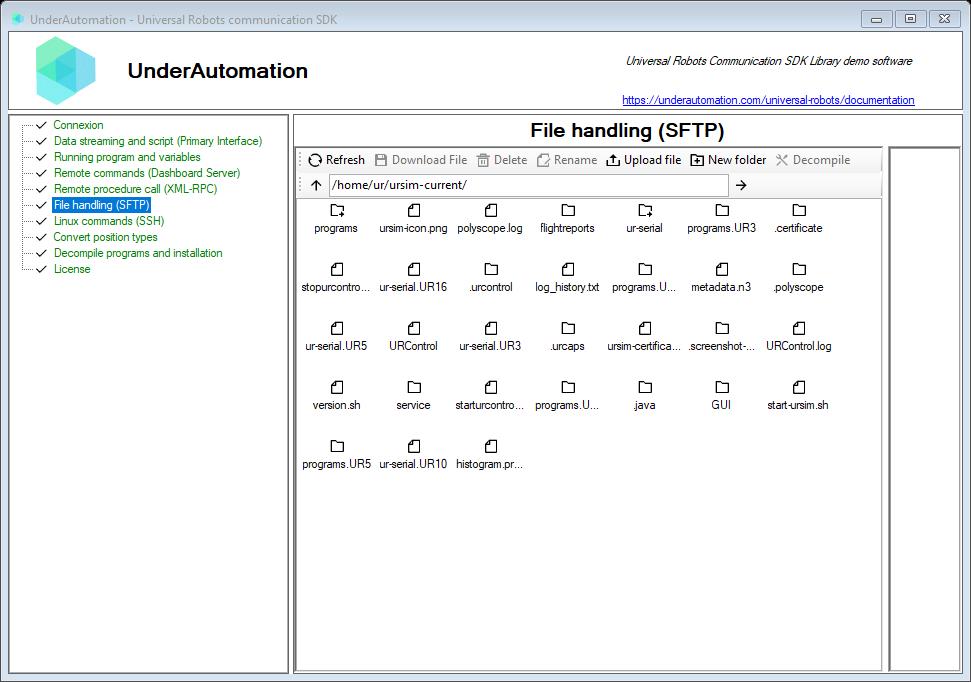
The demo application is open source. The C# source of this page is SftpControl.cs.
Reference
Provides a client for transferring files to and from the Universal Robots controller using the SFTP protocol.
| Member | Type | Description |
|---|---|---|
SftpClient() Constructor | ||
Connect(string, string, string, int) Method | void | Connects to the robot
|
Implementation of the SSH File Transfer Protocol (SFTP) over SSH for transfering files to the robot controller
| Member | Type | Description |
|---|---|---|
SftpClientBase() Constructor | ||
BufferSize Property | uint | Gets or sets the maximum size of the buffer in bytes. |
Connected Property read only | bool | Gets a value indicating if this client is connected to the robot |
OperationTimeout Property | TimeSpan | Gets or sets the operation timeout. |
ProtocolVersion Property read only | int | Gets sftp protocol version. |
WorkingDirectory Property read only | string | Gets remote working directory. |
AppendAllLines(string, string[]) Method | void | Appends lines to a file, creating the file if it does not already exist.
|
AppendAllLines(string, string[], Encoding) Method | void | Appends lines to a file by using a specified encoding, creating the file if it does not already exist.
|
AppendAllText(string, string) Method | void | Appends the specified string to the file, creating the file if it does not already exist.
|
AppendAllText(string, string, Encoding) Method | void | Appends the specified string to the file, creating the file if it does not already exist.
|
AppendText(string) Method | StreamWriter | Creates a StreamWriter that appends UTF-8 encoded text to the specified file, creating the file if it does not already exist.
|
AppendText(string, Encoding) Method | StreamWriter | Creates a StreamWriter that appends text to a file using the specified encoding, creating the file if it does not already exist.
|
BeginDownloadFile(string, Stream) Method | IAsyncResult | Begins an asynchronous file downloading into the stream.
|
BeginDownloadFile(string, Stream, AsyncCallback) Method | IAsyncResult | Begins an asynchronous file downloading into the stream.
|
BeginDownloadFile(string, Stream, AsyncCallback, object, Action<ulong>) Method | IAsyncResult | Begins an asynchronous file downloading into the stream.
|
BeginListDirectory(string, AsyncCallback, object, Action<int>) Method | IAsyncResult | Begins an asynchronous operation of retrieving list of files in remote directory.
|
BeginSynchronizeDirectories(string, string, string, AsyncCallback, object) Method | IAsyncResult | Begins the synchronize directories.
|
BeginUploadFile(Stream, string) Method | IAsyncResult | Begins an asynchronous uploading the stream into remote file.
|
BeginUploadFile(Stream, string, AsyncCallback) Method | IAsyncResult | Begins an asynchronous uploading the stream into remote file.
|
BeginUploadFile(Stream, string, AsyncCallback, object, Action<ulong>) Method | IAsyncResult | Begins an asynchronous uploading the stream into remote file.
|
BeginUploadFile(Stream, string, bool, AsyncCallback, object, Action<ulong>) Method | IAsyncResult | Begins an asynchronous uploading the stream into remote file.
|
ChangeDirectory(string) Method | void | Changes remote directory to path.
|
ChangePermissions(string, short) Method | void | Changes permissions of file(s) to specified mode.
|
ConnectInternal(string, int, string, string) Method | void | Connects to the robot's SFTP server.
|
Create(string) Method | SftpFileStream | Creates or overwrites a file in the specified path.
|
Create(string, int) Method | SftpFileStream | Creates or overwrites the specified file.
|
CreateDirectory(string) Method | void | Creates remote directory specified by path.
|
CreateText(string) Method | StreamWriter | Creates or opens a file for writing UTF-8 encoded text.
|
CreateText(string, Encoding) Method | StreamWriter | Creates or opens a file for writing text using the specified encoding.
|
Delete(string) Method | void | Deletes the specified file or directory.
|
DeleteDirectory(string) Method | void | Deletes remote directory specified by path.
|
DeleteFile(string) Method | void | Deletes remote file specified by path.
|
Disconnect() Method | void | Disconnects this client from the SFTP server. |
DownloadFile(string, Stream, Action<ulong>) Method | void | Downloads remote file specified by the path into the stream.
|
DownloadFile(string, string, Action<ulong>) Method | void | Downloads remote file specified by the path into the stream.
|
EndDownloadFile(IAsyncResult) Method | void | Ends an asynchronous file downloading into the stream.
|
EndListDirectory(IAsyncResult) Method | SftpFile[] | Ends an asynchronous operation of retrieving list of files in remote directory.
|
EndSynchronizeDirectories(IAsyncResult) Method | FileInfo[] | Ends the synchronize directories.
|
EndUploadFile(IAsyncResult) Method | void | Ends an asynchronous uploading the stream into remote file.
|
EnumerateInstallations() Method | string[] | Enumerates installations with .installation extension. It searches recursively installations in "/programs" if it exists, or "/home/ur/ursim-current/programs" for simulator |
EnumeratePrograms() Method | string[] | Enumerates programs with .urp extension. It searches recursively programs in "/programs" if it exists, or "/home/ur/ursim-current/programs" for simulator |
Exists(string) Method | bool | Checks whether file or directory exists;
|
Get(string) Method | SftpFile | Gets reference to remote file or directory.
|
GetAttributes(string) Method | SftpFileAttributes | Gets the SftpFileAttributes of the file on the path.
|
GetLastAccessTime(string) Method | DateTime | Returns the date and time the specified file or directory was last accessed.
|
GetLastAccessTimeUtc(string) Method | DateTime | Returns the date and time, in coordinated universal time (UTC), that the specified file or directory was last accessed.
|
GetLastWriteTime(string) Method | DateTime | Returns the date and time the specified file or directory was last written to.
|
GetLastWriteTimeUtc(string) Method | DateTime | Returns the date and time, in coordinated universal time (UTC), that the specified file or directory was last written to.
|
GetStatus(string) Method | SftpFileSytemInformation | Gets status using [email protected] request.
|
ListDirectory(string, Action<int>) Method | SftpFile[] | Retrieves list of files in remote directory.
|
Open(string, FileMode) Method | SftpFileStream | Opens a SftpFileStream on the specified path with read/write access.
|
Open(string, FileMode, FileAccess) Method | SftpFileStream | Opens a SftpFileStream on the specified path, with the specified mode and access.
|
OpenRead(string) Method | SftpFileStream | Opens an existing file for reading.
|
OpenText(string) Method | StreamReader | Opens an existing UTF-8 encoded text file for reading.
|
OpenWrite(string) Method | SftpFileStream | Opens a file for writing.
|
ReadAllBytes(string) Method | byte[] | Opens a binary file, reads the contents of the file into a byte array, and closes the file.
|
ReadAllLines(string) Method | string[] | Opens a text file, reads all lines of the file using UTF-8 encoding, and closes the file.
|
ReadAllLines(string, Encoding) Method | string[] | Opens a file, reads all lines of the file with the specified encoding, and closes the file.
|
ReadAllText(string) Method | string | Opens a text file, reads all lines of the file with the UTF-8 encoding, and closes the file.
|
ReadAllText(string, Encoding) Method | string | Opens a file, reads all lines of the file with the specified encoding, and closes the file.
|
ReadLines(string) Method | string[] | Reads the lines of a file with the UTF-8 encoding.
|
ReadLines(string, Encoding) Method | string[] | Read the lines of a file that has a specified encoding.
|
RenameFile(string, string) Method | void | Renames remote file from old path to new path.
|
RenameFile(string, string, bool) Method | void | Renames remote file from old path to new path.
|
SetAttributes(string, SftpFileAttributes) Method | void | Sets the specified SftpFileAttributes of the file on the specified path.
|
SymbolicLink(string, string) Method | void | Creates a symbolic link from old path to new path.
|
SynchronizeDirectories(string, string, string) Method | FileInfo[] | Synchronizes the directories.
|
UploadFile(Stream, string, Action<ulong>) Method | void | Uploads stream into remote file.
|
UploadFile(Stream, string, bool, Action<ulong>) Method | void | Uploads stream into remote file.
|
UploadFile(string, string, Action<ulong>) Method | void | Uploads file into remote file.
|
WriteAllBytes(string, byte[]) Method | void | Writes the specified byte array to the specified file, and closes the file.
|
WriteAllLines(string, string[]) Method | void | Writes a collection of strings to the file using the UTF-8 encoding, and closes the file.
|
WriteAllText(string, string) Method | void | Writes the specified string to the file using the UTF-8 encoding, and closes the file.
|
WriteAllText(string, string, Encoding) Method | void | Writes the specified string to the file using the specified encoding, and closes the file.
|
Represents SFTP file information
| Member | Type | Description |
|---|---|---|
Attributes Property read only | SftpFileAttributes | Gets the file attributes. |
FullName Property read only | string | Gets the full path of the directory or file. |
GroupCanExecute Property | bool | Gets or sets a value indicating whether the group members can execute this file. |
GroupCanRead Property | bool | Gets or sets a value indicating whether the group members can read from this file. |
GroupCanWrite Property | bool | Gets or sets a value indicating whether the group members can write into this file. |
GroupId Property | int | Gets or sets file group id. |
IsBlockDevice Property read only | bool | Gets a value indicating whether file represents a block device. |
IsCharacterDevice Property read only | bool | Gets a value indicating whether file represents a character device. |
IsDirectory Property read only | bool | Gets a value indicating whether file represents a directory. |
IsNamedPipe Property read only | bool | Gets a value indicating whether file represents a named pipe. |
IsRegularFile Property read only | bool | Gets a value indicating whether file represents a regular file. |
IsSocket Property read only | bool | Gets a value indicating whether file represents a socket. |
IsSymbolicLink Property read only | bool | Gets a value indicating whether file represents a symbolic link. |
LastAccessTime Property | DateTime | Gets or sets the time the current file or directory was last accessed. |
LastAccessTimeUtc Property | DateTime | Gets or sets the time, in coordinated universal time (UTC), the current file or directory was last accessed. |
LastWriteTime Property | DateTime | Gets or sets the time when the current file or directory was last written to. |
LastWriteTimeUtc Property | DateTime | Gets or sets the time, in coordinated universal time (UTC), when the current file or directory was last written to. |
Length Property read only | long | Gets or sets the size, in bytes, of the current file. |
Name Property read only | string | For files, gets the name of the file. For directories, gets the name of the last directory in the hierarchy if a hierarchy exists. Otherwise, the Name property gets the name of the directory. |
OthersCanExecute Property | bool | Gets or sets a value indicating whether the others can execute this file. |
OthersCanRead Property | bool | Gets or sets a value indicating whether the others can read from this file. |
OthersCanWrite Property | bool | Gets or sets a value indicating whether the others can write into this file. |
OwnerCanExecute Property | bool | Gets or sets a value indicating whether the owner can execute this file. |
OwnerCanRead Property | bool | Gets or sets a value indicating whether the owner can read from this file. |
OwnerCanWrite Property | bool | Gets or sets a value indicating whether the owner can write into this file. |
UserId Property | int | Gets or sets file user id. |
Delete() Method | void | Permanently deletes a file on remote machine. |
MoveTo(string) Method | void | Moves a specified file to a new location on remote machine, providing the option to specify a new file name.
|
SetPermissions(short) Method | void | Sets file permissions.
|
ToString() Method | string | Returns a string that represents this instance. |
UpdateStatus() Method | void | Updates file status on the server. |
Contains SFTP file attributes.
| Member | Type | Description |
|---|---|---|
Extensions Property read only | IDictionary<string,string> | Gets or sets the extensions. |
GroupCanExecute Property | bool | Gets a value indicating whether the group members can execute this file. |
GroupCanRead Property | bool | Gets a value indicating whether the group members can read from this file. |
GroupCanWrite Property | bool | Gets a value indicating whether the group members can write into this file. |
GroupId Property | int | Gets or sets file group id. |
IsBlockDevice Property read only | bool | Gets a value indicating whether file represents a block device. |
IsCharacterDevice Property read only | bool | Gets a value indicating whether file represents a character device. |
IsDirectory Property read only | bool | Gets a value indicating whether file represents a directory. |
IsNamedPipe Property read only | bool | Gets a value indicating whether file represents a named pipe. |
IsRegularFile Property read only | bool | Gets a value indicating whether file represents a regular file. |
IsSocket Property read only | bool | Gets a value indicating whether file represents a socket. |
IsSymbolicLink Property read only | bool | Gets a value indicating whether file represents a symbolic link. |
LastAccessTime Property | DateTime | Gets or sets the local time the current file or directory was last accessed. |
LastAccessTimeUtc Property | DateTime | Gets or sets the UTC time the current file or directory was last accessed. |
LastWriteTime Property | DateTime | Gets or sets the local time when the current file or directory was last written to. |
LastWriteTimeUtc Property | DateTime | Gets or sets the UTC time when the current file or directory was last written to. |
OthersCanExecute Property | bool | Gets a value indicating whether the others can execute this file. |
OthersCanRead Property | bool | Gets a value indicating whether the others can read from this file. |
OthersCanWrite Property | bool | Gets a value indicating whether the others can write into this file. |
OwnerCanExecute Property | bool | Gets a value indicating whether the owner can execute this file. |
OwnerCanRead Property | bool | Gets a value indicating whether the owner can read from this file. |
OwnerCanWrite Property | bool | Gets a value indicating whether the owner can write into this file. |
Size Property | long | Gets or sets the size, in bytes, of the current file. |
UserId Property | int | Gets or sets file user id. |
GetBytes() Method | byte[] | Returns a byte array representing the current SftpFileAttributes. |
SetPermissions(short) Method | void | Sets the permissions.
|
What to read next
- Transfer files and backups: a backup of the programs and the upload of a program.
- Program and installation files: open and change a
.urpfile on the PC.