Program and installation files
Open the .urp program and .installation files of a UR cobot on the PC, read and change their XML, and save them again.
A program (.urp) and an installation (.installation) of a Universal Robots cobot are compressed XML files. The SDK opens them on the PC, gives their XML, and writes them again. This page shows how, without a robot.
How it works
URProgram.Load and URInstallation.Load read a file and decompress it. XML is the content of the file, as an XElement: read it, change it, add elements. Save writes the file again: to a Stream, or to a folder, with the name of the program as file name.
To get a file from the robot, or to send it back, use SFTP. The XML format is the format of PolyScope: open a file saved by PolyScope to see the elements of an instruction.
Program files
static void Main(string[] args){// Open a program file downloaded from the robotURProgram program = URProgram.Load(@"C:\temp\my_program.urp");// Content of the program, as XMLXElement xml = program.XML;// For example, the installation used by the programxml.Attribute("installationRelativePath").Value = "default";// Save in a folder: the file name is the name of the program.// Then send the file to the robot with SFTPstring path = program.Save(@"C:\temp\modified");}}
Installation files
static void Main(string[] args){URInstallation installation = URInstallation.Load(@"C:\temp\default.installation");XElement xml = installation.XML;// For example, show the speed slider on the Run tabxml.Attribute("showSpeedSliderOnRunTab").Value = "true";// Save in a folder: the file name is the name of the installationstring path = installation.Save(@"C:\temp\modified");}}
A program or an installation changed by the SDK is loaded by PolyScope like any other file. Keep a copy of the original, and check the result in PolyScope or URSim before you use it on a robot.
Try it in the demo application
Everything on this page can be tried without writing code, in the Decompile programs and installation page of the demo application.
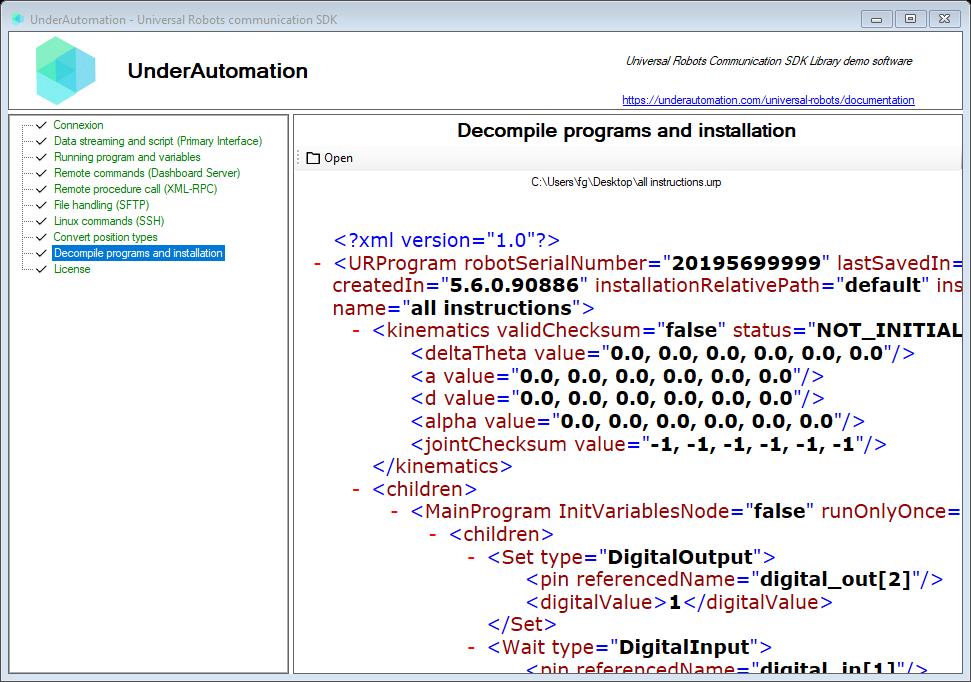
The demo application is open source. The C# source of this page is ArchiveControl.cs.
Reference
Contains basic methods to encode and decode a UR archive
| Member | Type | Description |
|---|---|---|
URArchive(XElement) Constructor | Initializes a new instance of URArchive from the specified XML element.
| |
Extension Property read only | string | Gets the file extension for this archive type (e.g., ".urp" or ".installation"). |
FileName Property read only | string | File name that should be used on a UR robot |
Name Property | string | Gets or sets the name of this archive, stored as an XML attribute. |
NameAttribute Property read only | string | Gets the XML attribute name used to store the archive name. |
RootElement Property read only | string | Gets the expected root XML element name for this archive type. |
XML Property read only | XElement | XML description of the object |
Load(Stream) Method static | XElement | Load a UR archive from stream and decode it as XML |
Load(string) Method static | XElement | Load a UR archive from file path and decode it as XML |
Save(Stream) Method | void | Save encoded file to a stream |
Save(string) Method | string | Save encoded file to a directory, overwrite it if it exists
|
Functions to compile and decompile a *.urp program file
| Member | Type | Description |
|---|---|---|
URProgram(XElement) Constructor | Creates a URProgram from its XML definition.
| |
Extension Property read only | string | Gets the file extension for this archive type (e.g., ".urp" or ".installation"). |
NameAttribute Property read only | string | Gets the XML attribute name used to store the archive name. |
RootElement Property read only | string | Gets the expected root XML element name for this archive type. |
EXTENSION Field | string | File extension for UR program files. |
Equals(object) Method | bool | Determines whether the specified object is equal to this program. |
GetHashCode() Method | int | Returns a hash code for this program. |
Load(Stream) Method static | URProgram | Load a program from stream |
Load(string) Method static | URProgram | Load a *.urp program from file path |
ToString() Method | string | Returns the file name of this program. |
Functions to encode and decode a *.installation file
| Member | Type | Description |
|---|---|---|
URInstallation(XElement) Constructor | Creates a URInstallation from its XML definition.
| |
Extension Property read only | string | Gets the file extension for this archive type (e.g., ".urp" or ".installation"). |
NameAttribute Property read only | string | Gets the XML attribute name used to store the archive name. |
RootElement Property read only | string | Gets the expected root XML element name for this archive type. |
EXTENSION Field | string | File extension for UR installation files. |
Equals(object) Method | bool | Determines whether the specified object is equal to this installation. |
GetHashCode() Method | int | Returns a hash code for this installation. |
Load(Stream) Method static | URInstallation | Load an installation file from stream |
Load(string) Method static | URInstallation | Load a *.installation file from path |
ToString() Method | string | Returns the file name of this installation. |